
Introduction
All Maple Systems HMIs programmed with EBPro (EasyBuilder Pro), including every cMT X Series and cMT Series model, are compatible with Siemens S7-200. Configure your Controller and HMI/cMT with the following parameters to establish reliable communication.
Supported Series: Siemens S7-200 series PLC
Website: http://www.siemens.com/entry/cc/en/
HMI Settings
| Parameters | Recommended | Options | Notes |
|---|---|---|---|
| PLC type | SIEMENS S7-200 | ||
| PLC I/F | RS485 2W | RS485 2W | |
| Baud rate | 9600 | 9600, 19200, 187.5K | The HMI which has a sticker “MPI187.5” on the rear cover supports 187.5K |
| Data bits | 8 | 7, 8 | |
| Parity | Even | Even, Odd, None | |
| Stop bits | 1 | 1, 2 | |
| PLC sta. no. | 2 | 1 ~ 126 | |
| Turn around delay | 5 | ||
| Send ACK delay (ms) | 30 | ||
| Online simulator | YES | ||
| Extend address mode | NO | ||
| Broadcast command | NO |
PLC Settings
Communication — Set station number to 2.
Device Address
| Bit/Word | Device Type | Format | Range | Memo |
|---|---|---|---|---|
| B | I | DDDDo | 0 ~ 40957 | Input (I) |
| B | Q | DDDDo | 0 ~ 40957 | Output (O) |
| B | M | DDDDo | 0 ~ 40957 | Bit Memory |
| B | VW_Bit | DDDDDo | 0 ~ 102397 | V Memory Bit Address |
| B | S | DDDDo | 0 ~ 40957 | SCR |
| B | SM | DDDDo | 0 ~ 40957 | Special Memory |
| B | T_Bit | DDD | 0 ~ 255 | Timer |
| B | C_Bit | DDD | 0 ~ 255 | Counter |
| Byte | VB | DDDDD | 0 ~ 10239 | V Memory |
| W | VW | DDDDD | 0 ~ 10239 | V Memory |
| W | VW_Odd | DDDDD | 0 ~ 10239 | V Memory Odd |
| DW | VD | DDDDD | 0 ~ 10239 | V Memory Double Word |
| DW | VD_Odd | DDDDD | 0 ~ 10239 | V Memory Double Word |
| W | VW_String | DDDDD | 0 ~ 10239 | String |
| W | VW_String_Odd | DDDDD | 0 ~ 10239 | String |
| DW | VD_String | DDDDD | 0 ~ 10239 | String |
| DW | VD_String_Odd | DDDDD | 0 ~ 10239 | String |
| Byte | MB | DDDDD | 0 ~ 10239 | Byte Memory |
| W | MW | DDDDD | 0 ~ 10239 | Word Memory |
| W | MW_Odd | DDDDD | 0 ~ 10239 | Word Memory |
| DW | MD | DDDDD | 0 ~ 10239 | Word Memory |
| Byte | SB | DDDDD | 0 ~ 10239 | SCR |
| W | SW | DDDDD | 0 ~ 10239 | SCR |
| DW | SD | DDDDD | 0 ~ 10239 | SCR |
| Byte | SMB | DDDDD | 0 ~ 10239 | Special Memory |
| W | SMW | DDDDD | 0 ~ 10239 | Special Memory |
| DW | SMD | DDDDD | 0 ~ 10239 | Special Memory |
| W | T | DDD | 0 ~ 255 | Timer |
| W | C | DDD | 0 ~ 255 | Counter |
NOTE: Double word and floating point values must use VD device type.
How to Import Tag
The tags created in the Symbol Table in Step7-MicroWIN software can be imported to EasyBuilder (EBPro).
Create Tags in Symbol Table
In Step7-MicroWIN, open the Symbol Table and create the tags. Select all the tags, right-click, and copy them.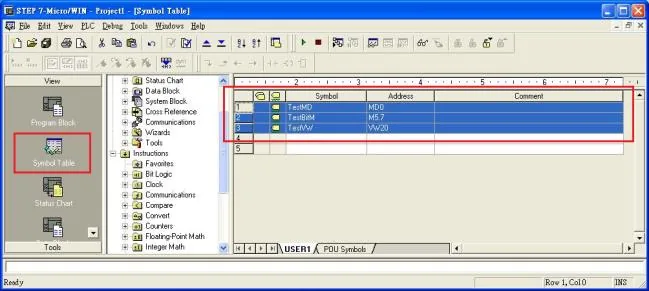
Add Driver in EasyBuilder (EBPro)
Launch EasyBuilder, add the Siemens S7-200 driver in the device list under System Parameter Settings, then click the Import Tag button.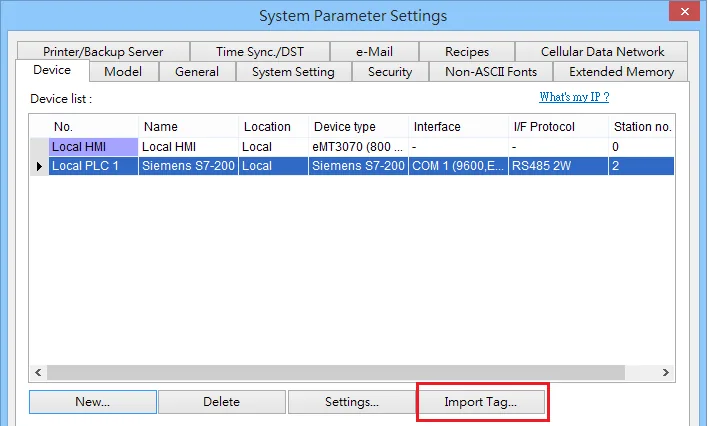
Paste Copied Tags
Paste the tags copied in step 1 into the Paste dialog and click OK.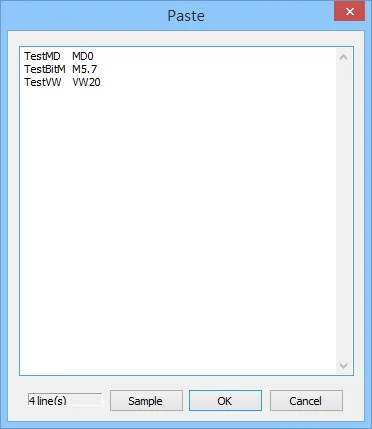
Select All Tags and Confirm
Select all the tags in the Add Tags dialog and click OK.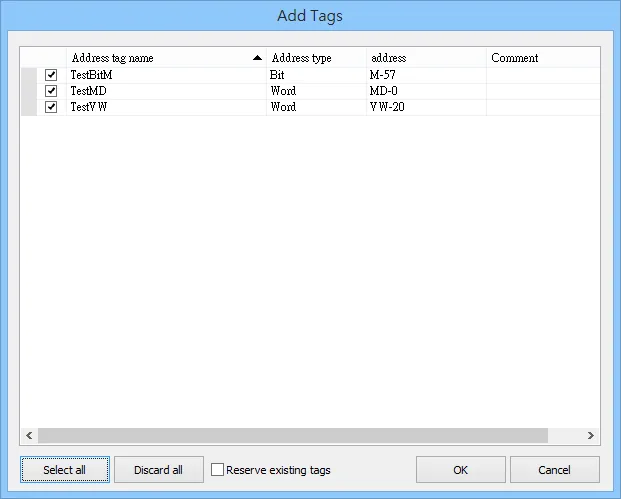
Verify Import Success
If the import succeeds, a confirmation message window appears.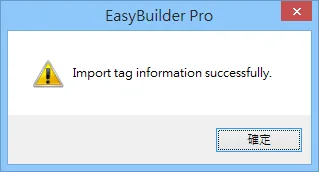
Wiring Diagram
NOTE: The serial port pin assignments may vary between HMI models.
RS-485 2W
| HMI | Direction | PLC |
|---|---|---|
| Pin assignments | RS485 2W 9 D-Sub Male | |
| Data- | ↔ (bidirectional) | 8 Data- |
| Data+ | ↔ (bidirectional) | 3 Data+ |
| GND | ↔ (bidirectional) | 5 GND |