
Introduction
All Maple Systems HMIs programmed with EBPro (EasyBuilder Pro), including every cMT X Series and cMT Series model, are compatible with a Koyo (Automation Direct) CLICK PLC. Configure your Controller and HMI/cMT with the following parameters to establish reliable communication.
Supported Series: KOYO CLICK PLC series
Website: www.automationdirect.com
HMI Settings
| Parameter | Recommended | Options | Notes |
|---|---|---|---|
| PLC type | KOYO CLICK | ||
| PLC I/F | RS232 | ||
| Baud rate | 38400 | 1200~115200 | |
| Data bits | 8 | ||
| Parity | Odd | Odd, Even, None | |
| Stop bits | 1 | 1, 2 | |
| PLC sta. no. | 1 | 1~247 | |
| Turn around delay | 5 | 5~10 |
NOTE: Turn around delay should be set to 10 when the PLC firmware version is 2.1 or later.
Device Address
| Bit/Word | Device type | Format | Range | Memo |
|---|---|---|---|---|
| B | X | Ddd | 001~816 | Input Status (Read Only) |
| B | Y | Ddd | 001~816 | Output Status |
| B | C | DDDD | 1~2000 | Control Bit |
| B | T | DDD | 1~500 | Timer Status (Read Only) |
| B | CT | DDD | 1~250 | Counter Status (Read Only) |
| B | SC | DDDD | 1~1000 | System Control Bit (Read Only) |
| W | DS | DDDD | 1~4500 | Data Registers |
| W | DD | DDDD | 1~1000 | Data Registers (Double Word) |
| W | DH | DDD | 1~500 | Data Registers |
| W | DF | DDD | 1~500 | Data Registers (Double Word) |
| W | XD | D | 0~8 | Input Status Registers (Read Only) |
| W | YD | D | 0~8 | Output Status Registers |
| W | TD | DDD | 1~500 | Timer Current Values (Read Only) |
| W | CTD | DDD | 1~250 | Counter Current Values (Double Word / Read Only) |
| W | SD | DDDD | 1~1000 | System Data Registers (Read Only) |
| W | TXT | DDDD | 1~1000 | Text Data Registers |
Wiring Diagram
NOTE: The serial port pin assignments may vary between HMI models.
RS-232
The following is the view from the soldering point of a connector.
KOYO CLICK PLC Com Port:
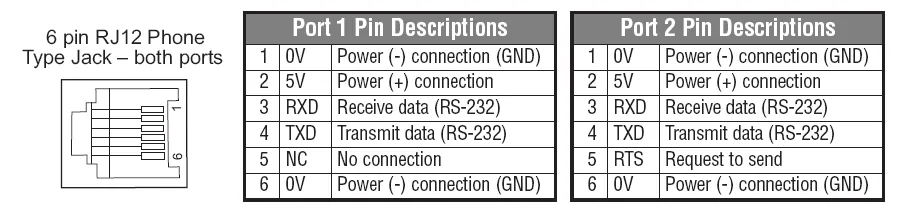
| HMI | Direction | PLC |
|---|---|---|
| Pin assignments | RS232 6P RJ12 Male | |
| Rx | ↔ (bidirectional) | 4 TXD |
| Tx | ↔ (bidirectional) | 3 RXD |
| GND | ↔ (bidirectional) | 1 GND |