Introduction
All Maple Systems HMIs programmed with EBPro (EasyBuilder Pro), including every cMT X Series and cMT Series model, are compatible with Sick Flexi Soft. Configure your Controller and HMI/cMT with the following parameters to establish reliable communication.
Protocol: RS-232 / Ethernet
HMI Settings
| Parameters | Recommended | Options | Notes |
|---|---|---|---|
| PLC type | SICK FLEXI SOFT | ||
| PLC I/F | RS232 | RS232 / Ethernet | |
| Baud rate | 115200 | 9600 ~ 115200 | |
| Data bits | 8 | ||
| Parity | None | ||
| Stop bits | 1 | ||
| PLC sta. no. | 1 | ||
| Port | 9000 | Ethernet setting |
Device Address
| Bit/Word | Device type | Format | Range | Memo |
|---|---|---|---|---|
| B | I | DDo | 0 ~ 127 | Input |
| B | Q | DDo | 0 ~ 127 | Output |
| B | Logic result | DDo | 0 ~ 197 | Logic Result |
| B | RS-232 to Flexi soft Bit | DDo | 0 ~ 37 | RS-232 |
| B | Flexi soft to RS-232_Bit | DDo | 0 ~ 997 | |
| B | Module Status Bit Array_Bit | DDo | 0 ~ 597 | |
| B | Operating Data Block_Bit | Do | 0 ~ 97 | |
| B | Configuration CRCs_Bit | DDo | 0 ~ 197 | |
| B | CPU Module Type Key_Bit | DDo | 0 ~ 177 | |
| B | Extension Modules Type_Bit | DDDo | 0 ~ 3377 | |
| W | RS-232 to Flexi soft | D | 0 ~ 2 | |
| W | Flexi soft to RS-232 | DD | 0 ~ 97 | |
| W | Module Status Bit Array | DD | 0 ~ 58 | |
| W | Operating Data Block | D | 0 ~ 8 | |
| W | Configuration CRCs | DD | 0 ~ 18 | |
| W | CPU Module Type Key | DD | 0 ~ 16 | |
| W | Extension Modules Type | DDD | 0 ~ 336 |
Wiring Diagrams
NOTE: The serial port pin assignments may vary between HMI models.
RS-232
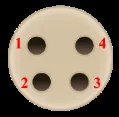
The view from the soldering point of a cable.
| HMI | Direction | PLC |
|---|---|---|
| Pin assignments | CPU0 Port0 4P Mini-DIN Male | |
| Rx | ↔ (bidirectional) | 3 |
| Tx | ↔ (bidirectional) | 2 |
| GND | ↔ (bidirectional) | 4 |
Ethernet