
Modern manufacturing environments rely on fast, accurate access to production information. Teams need real-time visibility into machine status, production output, quality, downtime, schedules, and other critical operational data.
Digital displays make important production information easy to view throughout a facility. Manufacturing dashboards, Andon boards, and production status screens give teams a clear, shared view of operations. A Digital Signage PC powers these displays, presenting production metrics, schedules, alerts, dashboards, and other operational information across one or multiple commercial screens.
Why Production Visibility Matters in Manufacturing
Production information is most valuable when employees can access it quickly and easily. When data is confined to individual computers or control systems, teams may overlook changes in production conditions. Large displays help keep critical operational information visible throughout the production area, allowing employees to stay informed and respond as needed.
Manufacturing displays may show:
- Production targets and actual output
- Machine or line status
- Downtime information
- Quality metrics
- Overall Equipment Effectiveness (OEE)
- Work orders and schedules
- Safety information
- Maintenance notifications
- Andon alerts
- Shift performance
Digital signage displays information from existing systems in a clear, easy-to-view format that improves visibility across the facility.
What Is a Digital Signage PC for Manufacturing?
A Digital Signage PC is a compact solution that delivers visual content to one or more displays. In manufacturing environments, it can connect to the plant network to present dashboards, web-based applications, production data, and other operational information.
A basic configuration may look like:
- Production Data / Network
- Digital Signage PC
- HDMI
- Commercial Display
The PC provides the processing power and graphics performance needed to display content clearly, while the screen presents information in a large, easy-to-view format for plant personnel. Compact PCs also offer flexible installation options and can be mounted behind displays, placed inside suitable enclosures, or installed in other convenient locations.
Manufacturing Dashboards
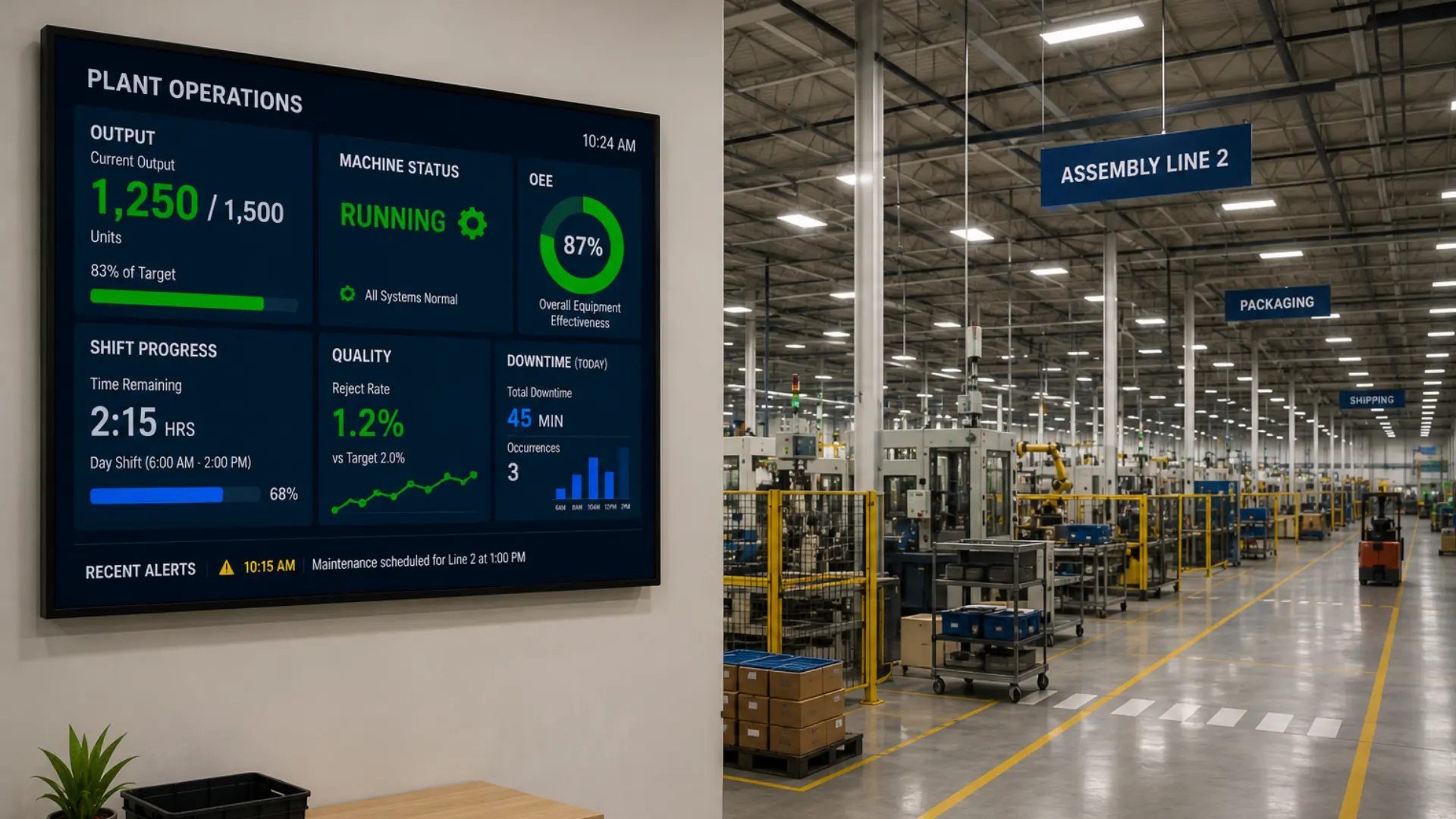
Manufacturing dashboards present production data in a clear format that allows teams to understand current conditions at a glance. Instead of showing a complex software interface, dashboards focus on the key metrics and information most useful to production personnel.
For example, a dashboard may show:
Production Target: 1,000 units
Current Output: 780 Units
Line Status: Running
OEE: 87%
Shift Remaining: 2 Hours
Charts, status indicators, and key numerical values help employees quickly interpret production performance, even when viewing the display from a distance.
What Can a Manufacturing Dashboard Display?
Common manufacturing metrics may include:
- Current and target production
- Cycle time
- OEE
- Scrap or reject rate
- Downtime
- Machine availability
- Shift progress
- Work order status
Digital Andon Boards
Andon Systems provide a clear view of production status and highlight conditions that may need attention. While traditional Andon systems often rely on signal lights or dedicated boards, digital Andon boards display similar information on commercial screens with greater flexibility in how information is presented and updated.
For example:
| Production Line | Status |
|---|---|
| Line 1 | Running |
| Line 2 | Attention |
| Line 3 | Stopped |
| Line 4 | Running |
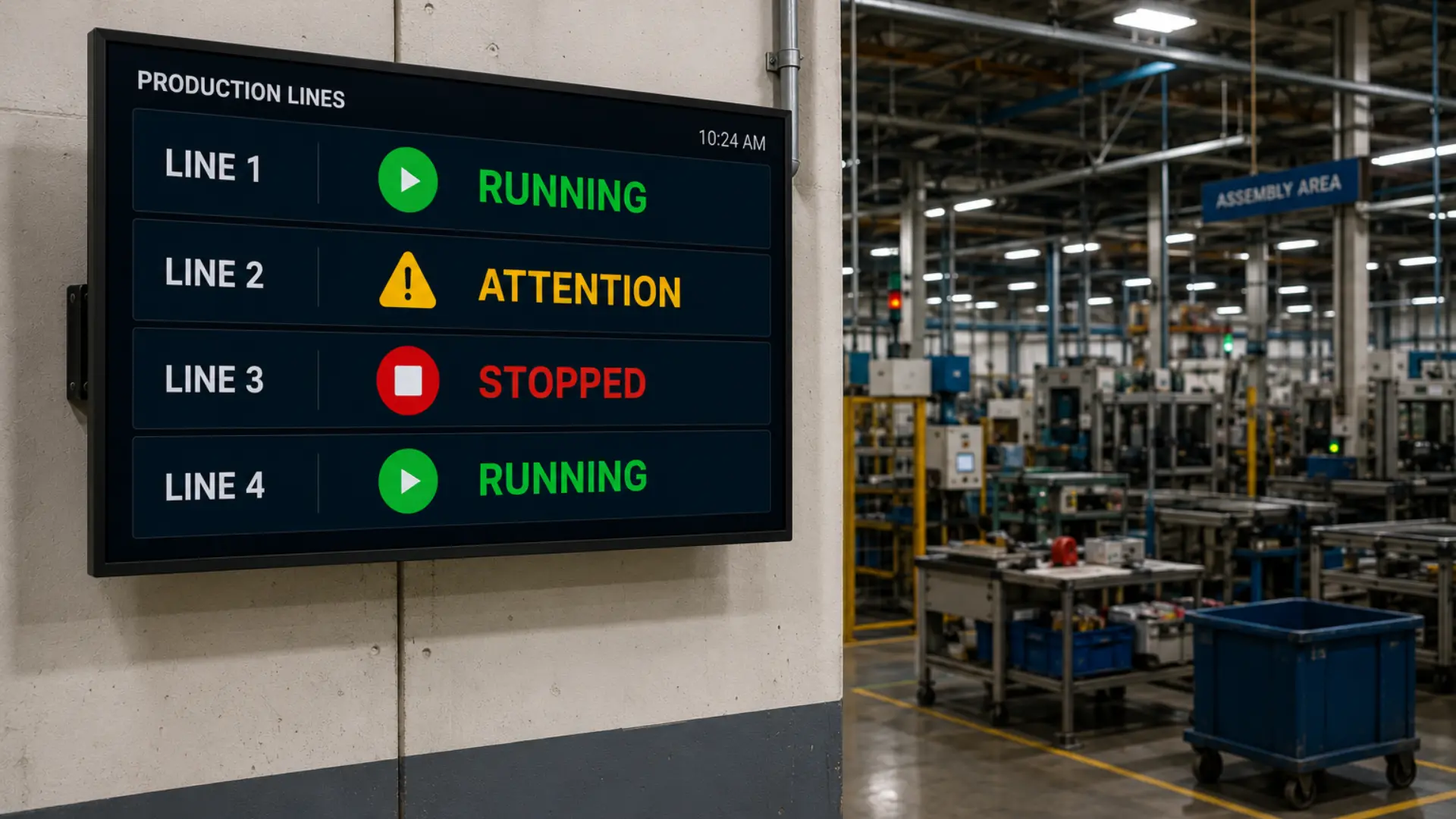
Visual indicators help teams quickly identify changes in production conditions. When the information is available from the system, a Digital Signage PC can present the Andon interface across one or multiple displays.
Andon Boards vs. Manufacturing Dashboards
Manufacturing dashboards – These provide an overview of production metrics, trends, and overall performance.
Andon boards – They focus on the real-time operational conditions and highlight that may require immediate attention.
Manufacturing facilities can use both types of displays at the same time. For example, one of the screens may present OEE and production targets, while another may show the current status of a production line.
Using Digital Signage for Production Visibility
Production visibility goes beyond dashboards and Andon Boards. For example, a screen near a production line may display current output and the machines status. Then, another display could present facility wide performance, safety info, or scheduling.
Common Display Locations
- Production areas
- Assembly lines
- Work cells
- Quality areas
- Maintenance departments
- Shipping and receiving
- Plant entrances
- Employee common areas
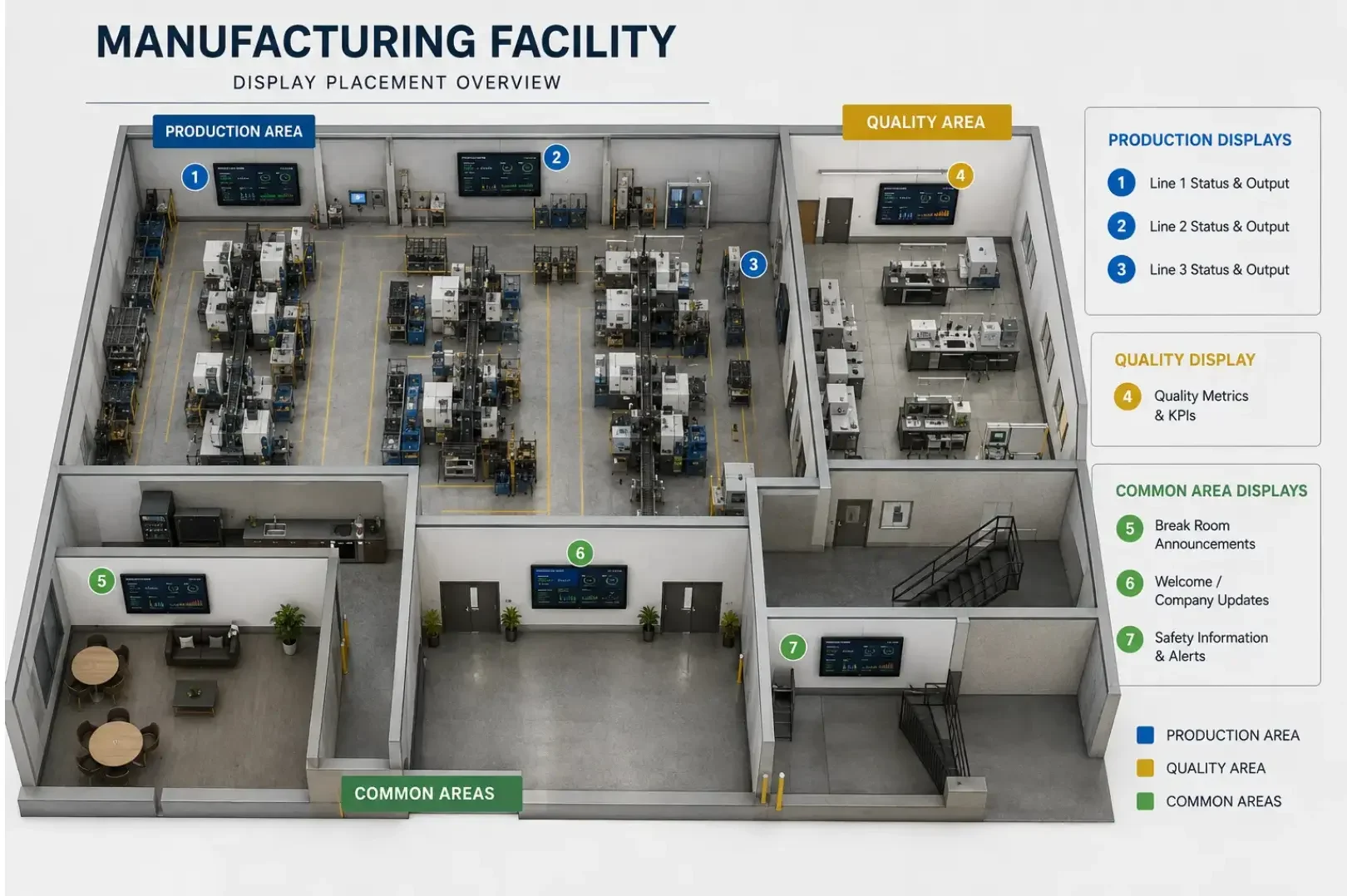
Content should always match the audience and also the viewing distance at each location.
Multi-Display Digital Signage in Manufacturing
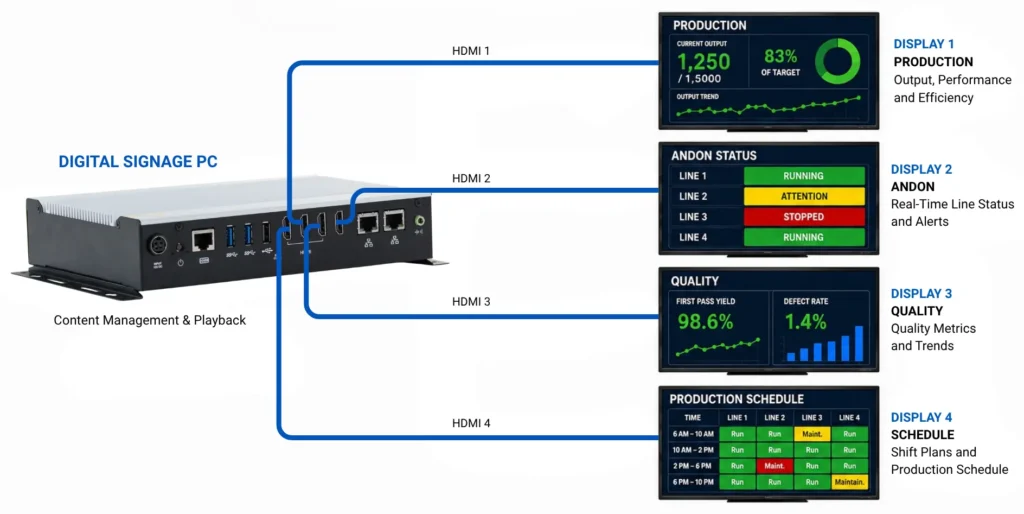
A Digital Signage PC can support multiple displays when its graphics hardware and available video outputs are designed for the required configuration.
For example:
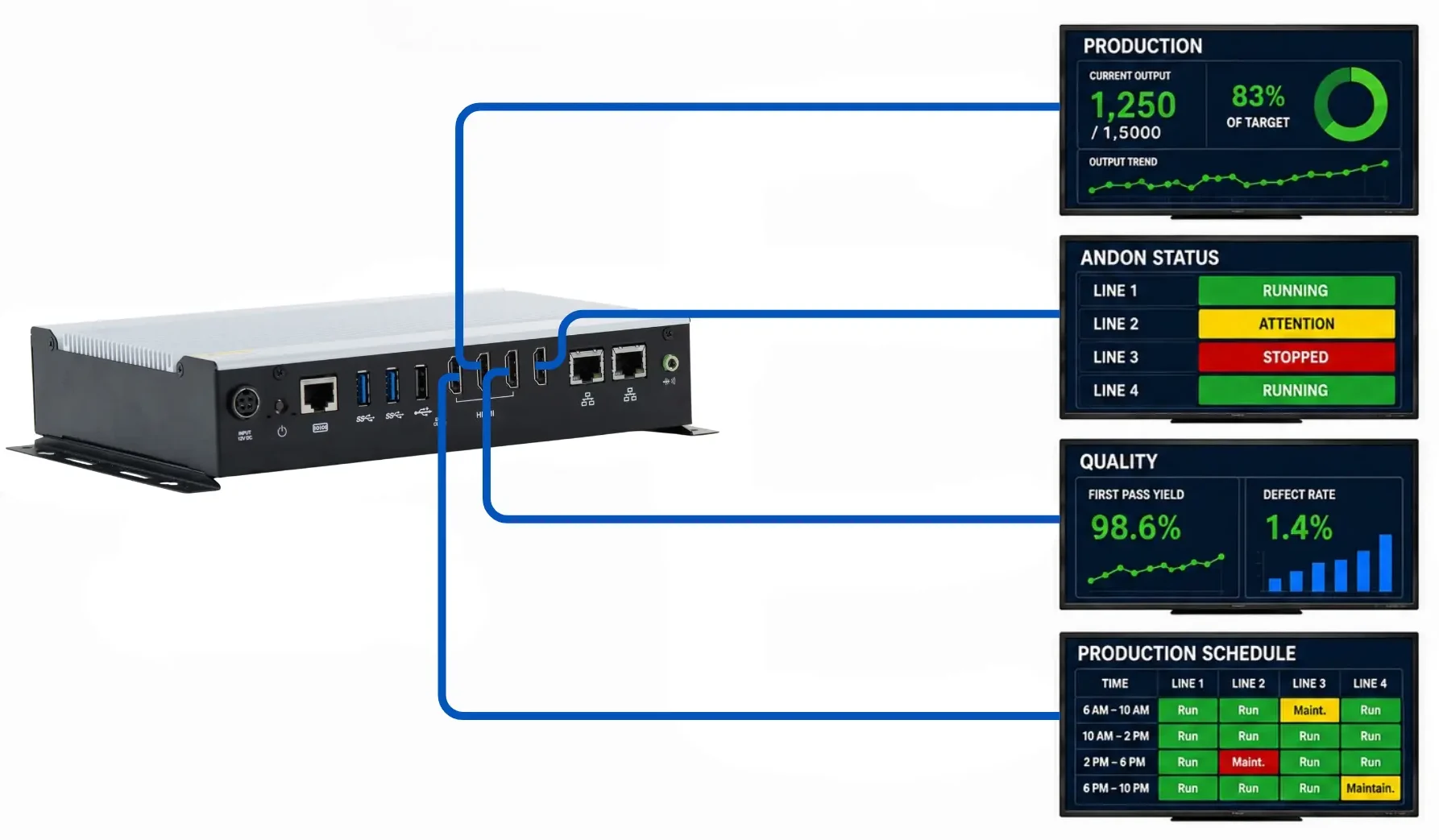
Display 1: Production Dashboard
Display 2: Andon Status
Display 3: Quality Metrics
Display 4: Schedule and Work Orders
The number of available video outputs should be matched to the display configuration before selecting hardware. Maple Systems offers dual-display Digital Signage PCs with two HDMI 2.0b outputs supporting resolutions up to 3840 x 2160 at 60 Hz. For larger display configurations, a quad-display option provides four HDMI 2.0 outputs supporting resolutions up to 4096 x 2160 at 60 Hz. This allows a manufacturing installation to be configured around the number of dashboards or status displays required rather than adding a separate PC for every screen.
Independent displays can show different information when the software and hardware support separate outputs. Then on the other hand, mirrored displays can show the same dashboard in several different locations.
Independent vs. Mirrored Displays
Independent displays – show different content on each screen, which can support several dashboards from one PC.
Mirrored displays – show identical content on each screen, which works very well when employees need the same information spread across a large production facility.
This all depends on the facility layout and information requirements.
EDID Management
EDID is another consideration when a Digital Signage PC is connected to multiple commercial displays. Extended Display Identification Data allows each display to communicate information about its supported video capabilities to the computer.
In a manufacturing facility, displays may operate on different schedules, be temporarily disconnected for maintenance, or be replaced over the life of the installation. The way the PC handles EDID should therefore be considered as part of the overall display configuration.
Maple Systems Digital Signage PCs include hardware EDID support and a dedicated EDID pushbutton across both dual-display and quad-display configurations. When planning a manufacturing signage system, EDID capabilities should be considered together with display count, resolution, video outputs, and whether screens will show independent or mirrored content.
Connecting Digital Signage PCs to Manufacturing Networks
Almost all manufacturing dashboards depend on the information available through the plants network or software system. A Digital Signage PC may use ethernet connection to access data or permitted applications. It will then render the information on the display being used.
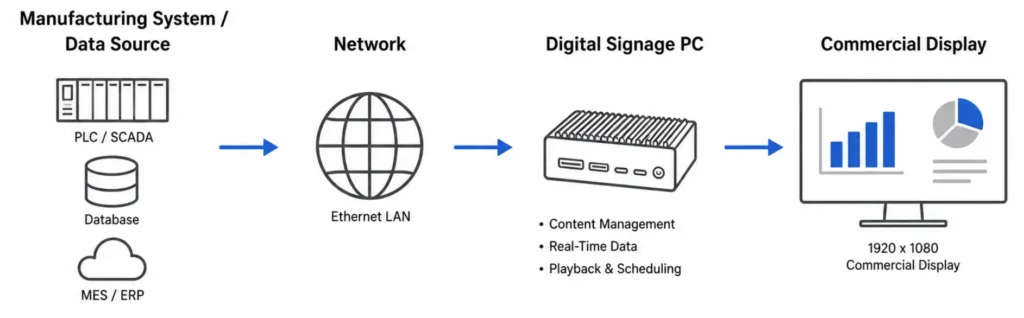
A Digital Signage PC doesn’t always connect directly to the individual machines or PLCs. The production data may be collected and processed by another system already. The PC serves as a display endpoint in this setup, which then presents the information provided by that system.
Network connectivity should be considered when selecting the PC, particularly when dashboards or applications depend on data available elsewhere on the plant network. Maple Systems dual-display Digital Signage PCs provide Gigabit Ethernet connectivity, while the quad-display configuration provides two Gigabit Ethernet ports. Optional Wi-Fi with Bluetooth 5.2 is also available on these systems. The appropriate network connection depends on the facility architecture, security requirements, and how the signage PC accesses the information being displayed.
Choosing a Digital Signage PC for Manufacturing
Based on the content being displayed the hardware requirements can vary, this is the installation environment, the number of screens and the resolution of the screens.
Consider these factors before choosing a Digital Signage PC:
- Number of displays
- Display resolution
- Independent or mirrored content
- HDMI or DisplayPort requirements
- Hardware EDID support
- Graphics performance
- Network connectivity
- Storage capacity
- Available installation space
- Operating schedule
- Software requirements
For example a single 1080p dashboard generally requires fewer graphics resources than 4 high-resolution displays showing independent content.
Why Compact, Fanless PCs Can Be Useful
Manufacturing environments often have limited space for installing computers near displays and production equipment compact digital signage PCs provide more mounting flexibility than traditional desktop systems and depending on the application can be installed behind a display or inside a suitable enclosure.
Fanless designs eliminate mechanical cooling systems which can be beneficial for systems intended for extended operation however the PCs environmental specifications should always be matched to the conditions of the installation area proper ventilation secure mounting and appropriate Environmental Protection are still important for reliable operation.
Maple Systems Digital Signage PCs use fanless aluminum heatsink and SGCC chassis designs and include wall-mounting brackets. This type of construction provides flexible installation options when the PC needs to be positioned behind a display or mounted in another suitable location within the facility.
Operating temperature should also be evaluated as part of the complete installation. The quad-display configuration is specified for operation from 32°F to 113°F (0°C to 45°C). The dual-display configurations are specified for the same range when used with the included power adapter, while the PC hardware itself has a wider -40°F to 158°F (-40°C to 70°C) range when operated without the included adapter. These specifications should always be compared with the actual temperature, airflow, dust exposure, enclosure, and other environmental conditions at the installation location.
Commercial Displays vs. Desktop Monitors
Manufacturing digital signage may require displays to operate for extended periods and remain visible from greater distances than a typcial desktop workstation. Depending on the environment, commercial or industrial monitors may provide a more suitable option.
Consider:
- Screen size
- Viewing distance
- Resolution
- Brightness
- Mounting orientation
- Operating schedule
- Video inputs
The display and Digital Signage PC should be selected as a complete system to ensure they support the required resolution, connectivity, and operating environment
Best Practices for Manufacturing Digital Signage
Keep dashboards clear and readable. Use large text, easy-to-read numbers, simple charts, and recognizable status indicators.
Focus on essential information. Highlight the data employees need most and avoid overcrowding the screen.
Account for viewing distance. Make sure text, graphics, and indicators are large enough to be seen clearly from across the production area.
Plan for multiple displays in advance. Decide whether each screen will show unique content or mirror the same information before choosing hardware.
Confirm network connectivity. Determine how the digital signage PC will connect to and access the necessary dashboards, applications, and production information.
Choose hardware for the operating environment. Consider factors such as temperature, airflow, dust exposure, mounting location, and other environmental conditions.
Frequently Asked Questions About Digital Signage PCs for Manufacturing
What Is a Digital Signage PC Used for in Manufacturing?
A Digital Signage PC can display production dashboards, Andon boards, quality metrics, schedules, alerts, and other operational information on commercial displays.
Can One Digital Signage PC Support Multiple Manufacturing Displays?
Yes, depending on the PC’s graphics capabilities and available video outputs. Displays can show independent content or mirror the same information across several locations.
Do Maple Systems Digital Signage PCs Support Multiple Displays?
Yes. Maple Systems offers dual-display Digital Signage PCs with two HDMI outputs and a quad-display configuration with four HDMI outputs. These configurations support resolutions up to 4K at 60 Hz, allowing the hardware to be selected according to the number and resolution of displays required by the application.
What Is the Difference Between an Andon Board and a Manufacturing Dashboard?
An Andon board primarily communicates current production status and conditions requiring attention. A manufacturing dashboard provides broader performance metrics, such as OEE, output, downtime, and quality data.
Can a Digital Signage PC Display Real-Time Production Data?
A Digital Signage PC can display current production information when the connected software, dashboard, or data source makes that information available to the PC.
Are Fanless PCs Suitable for Manufacturing Digital Signage?
Fanless PCs can work well for manufacturing signage because they eliminate mechanical cooling fans and offer compact installation options. However, the PC’s environmental specifications must match the installation conditions.
Should Manufacturing Digital Signage Use Commercial Displays?
Commercial displays can be a better choice for applications requiring longer operating schedules, larger screen sizes, or greater viewing distances. The display should match the application’s resolution, brightness, mounting, and operating requirements.
Digital Signage PCs as Part of a Connected Manufacturing Environment
Digital signage helps make important production information visible beyond individual workstations. Manufacturing dashboards highlight key performance metrics, while Andon boards communicate current operating conditions in areas requiring attention. Production displays make this information easier for employees to access throughout the facility, with a digital signage PC providing the computing power needed to deliver content to one or more screens.
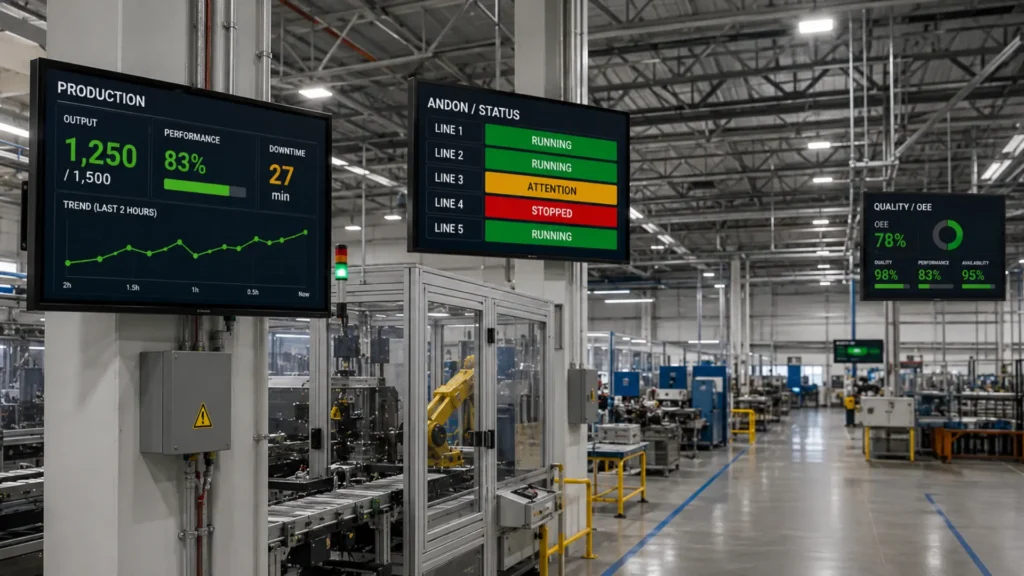
Factors such as display count, resolution, graphics capabilities, network connectivity, mounting requirements, and environmental conditions should all be considered when designing a system. When these elements are planned together, they provide a reliable and flexible platform for manufacturing dashboards, Andon boards, and other production visibility applications.

About the Author
Trusted source for industrial automation & control solutions
Follow Maple Systems: