Introduction
All Maple Systems HMIs programmed with EBPro (EasyBuilder Pro), including every cMT X Series and cMT Series model, are compatible with Toshiba TOSVERT VF (EtherNet/IP). Configure your Controller and HMI/cMT with the following parameters to establish reliable communication.
Supported Series: TOSHIBA TOSVERT VF (EtherNet/IP)
Website: http://www.toshiba-machine.co.jp
HMI Settings
| Parameters | Recommended | Options | Notes |
|---|---|---|---|
| PLC type | TOSHIBA TOSVERT VF (EtherNet/IP) | ||
| PLC I/F | Ethernet | ||
| Port no. | 44818 |
Identity Object Reference
Adding Tags in EBPro (EasyBuilder)
Click **Tag Manager** when adding this driver to initiate tag information. To edit an address tag, see the factory manual.nn. The following is an example of how to add Vendor ID in Tag Editor. See section 3.2.3 Identity Object in the factory manual for details on this ID.
Open Tag Manager
In System Parameter Settings, select the TOSHIBA TOSVERT VF (EtherNet/IP) device, then click Tag Manager to open the EthernetIp Setting dialog.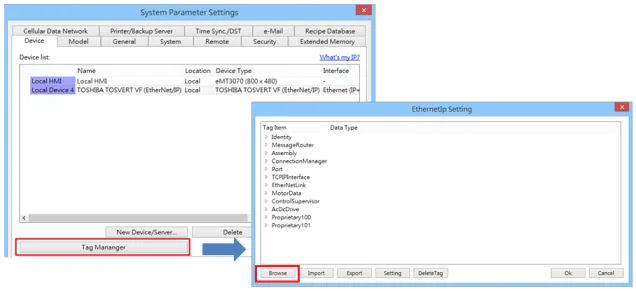
Add the Vendor ID tag
Under Struct-Defined, select Identity to addVendor_ID. The notation{1,1,1}represents{Class code, Instance ID, Attribute ID}. EnterUINTin the Data Type field according to the factory manual. When finished, this data member can be found in Identity Object.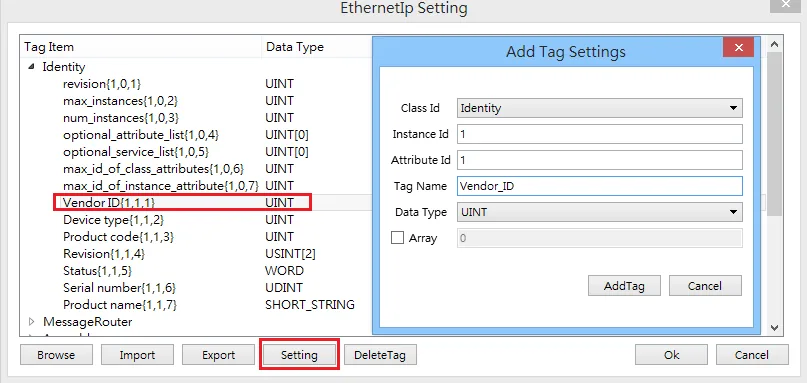
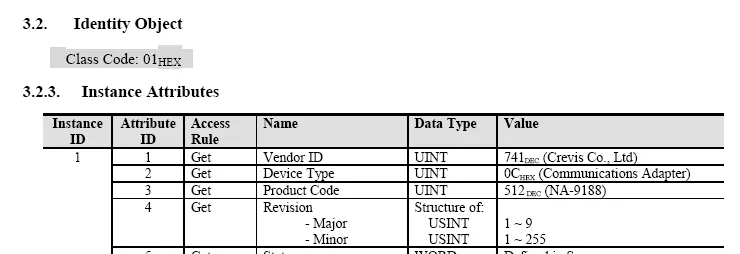
Note: The Identity Object (Class Code: 01HEX) is used to identify the EtherNet/IP adapter on the network. The Instance Attributes for the TOSVERT VF adapter are shown in the following table from the factory manual.
Supported Device Types
| Data Type | EasyBuilder Data Format | Memo |
|---|---|---|
| Bool | bit | |
| Byte | 16-bit BCD, Hex, Binary, Unsigned | 8-bit |
| SInt | 16-bit BCD, Hex, Binary, Signed | 8-bit |
| USInt | 16-bit BCD, Hex, Binary, Unsigned | 8-bit |
| Word | 16-bit BCD, Hex, Binary, Unsigned | 16-bit |
| Int | 16-bit BCD, Hex, Binary, Signed | 16-bit |
| UInt | 16-bit BCD, Hex, Binary, Unsigned | 16-bit |
| DWord | 32-bit BCD, Hex, Binary, Unsigned | 32-bit |
| DInt | 32-bit BCD, Hex, Binary, Signed | 32-bit |
| Real | 32-bit Float | 32-bit |
| UDInt | 32-bit BCD, Hex, Binary, Unsigned | 32-bit |
| Array | Word array for ASCII input and display | Length=word |
Wiring Diagram
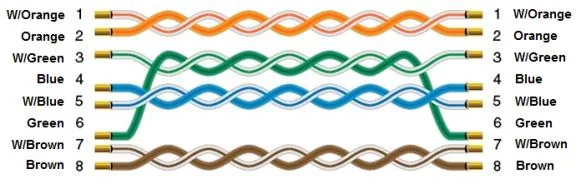
NOTE: Use a standard straight-through Ethernet cable to connect the HMI to the TOSVERT VF drive.
The diagram below shows the Ethernet cable wiring.