
Introduction
All Maple Systems HMIs programmed with EBPro (EasyBuilder Pro), including every cMT X Series and cMT Series model, are compatible with an Rockwell/Allen-Bradley DF1 BCC PLC. Configure your Controller and HMI/cMT with the following parameters to establish reliable communication.
Supported Series: Rockwell/Allen-Bradley MicroLogix 1000, 1100, 1200, 1400, 1500, SLC 5/01, 5/02, 5/03, 5/04, 5/05.
Website: https://www.rockwellautomation.com/
NOTE: Allen-Bradley DF1 (BCC) and Allen-Bradley DF1 are the same; the only difference is the use of BCC checksum.
HMI Setting
| Parameters | Recommended | Options | Notes |
|---|---|---|---|
| PLC type | Rockwell DF1 (BCC) | ||
| PLC I/F | RS232 | ||
| Baud rate | 19200 | 9600, 19200, 38400 | |
| Data bits | 8 | 8 | |
| Parity | None | Even, Odd, None | |
| Stop bits | 1 | 1 | |
| HMI sta. no. | 0 | ||
| PLC sta. no. | 1 | 1–31 |
PLC Setting
Communication mode: DF1 Full Duplex protocol 19200, None, 8, 1 (default). Error Check: BCC.
Device Address
| Bit/Word | Device type | Format | Range | Memo |
|---|---|---|---|---|
| B | I1 | DDDdd | 0 ~ 25515 | Input (I) |
| B | O0 | DDDdd | 0 ~ 25515 | Output (O) |
| B | I1n_Bit | SSEEdd | 0 ~ 303115 | SS: slot, EE: sub element, dd: bit |
| B | O0n_Bit | SSEEdd | 0 ~ 303115 | SS: slot, EE: sub element, dd: bit |
| B | B3 | DDDdd | 0 ~ 25515 | Bit data file (B3) |
| B | B10 ~ 13 | DDDdd | 0 ~ 25515 | Bit data file (B10 ~ 13) |
| B | S_Bit | DDDdd | 0 ~ 25515 | Status (S) bit level |
| B | Lfn_Bit | FFFDDDdd | 0 ~ 25525531 | Long (Bit) |
| B | Bfn | FFFDDDdd | 0 ~ 25525515 | Bit data file (B3, 10 ~ 254) |
| B | NfnBit | FFFDDDdd | 0 ~ 25525515 | Integer data file bit level (N7, 10 ~ 254) |
| W | I1n | SSEE | 0 ~ 3031 | SS: slot, EE: sub element |
| W | O0n | SSEE | 0 ~ 3031 | SS: slot, EE: sub element |
| W | T4SV | DDD | 0 ~ 255 | Timer Preset Value (T4) |
| W | T4PV | DDD | 0 ~ 255 | Timer Accumulator Value (T4) |
| W | C5SV | DDD | 0 ~ 255 | Counter Preset Value (C5) |
| W | C5PV | DDD | 0 ~ 255 | Counter Accumulator Value (C5) |
| W | TfnSV | FFFDDD | 0 ~ 255255 | Timer Preset Value |
| W | TfnPV | FFFDDD | 0 ~ 255255 | Timer Accumulator Value |
| W | CfnSV | FFFDDD | 0 ~ 255255 | Counter Preset Value |
| W | CfnPV | FFFDDD | 0 ~ 255255 | Counter Accumulator Value |
| W | N7 | DDD | 0 ~ 255 | Integer data file (N7) |
| W | N10~15 | DDD | 0 ~ 255 | Integer data file (N10 ~ 15) |
| W | Nfn | FFFDDD | 0 ~ 255255 | Integer data file (N7, 10 ~ 254) |
| W | S | DDD | 0 ~ 255 | Status (S) |
| DW (F) | F8 | DDD | 0 ~ 255 | Floating point data file (F8) |
| DW (F) | Ffn | FFFDDD | 0 ~ 255255 | Floating point data file |
| DW | Lfn | FFFDDD | 0 ~ 255255 | Long |
| W | Bfn_Word | FFFDDD | 0 ~ 255255 | Bit data file (Word) |
| W | STfn | DDD.DDD.DD | 0 ~ 255.255.40 | File no. Element no. Data no. |
Import Tags
-
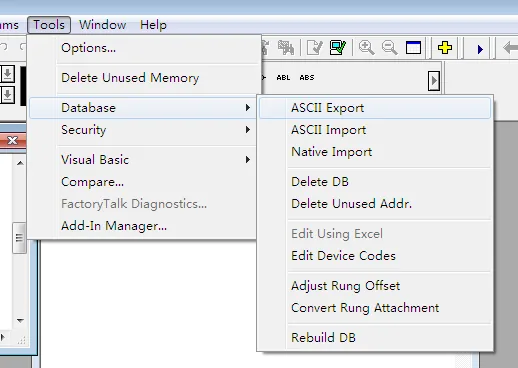
Open ASCII Export Tool
In RSLogix 500, navigate to Tools → Database → ASCII Export.
-
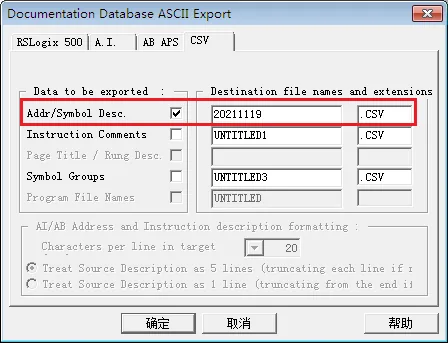
Configure CSV Export Settings
Select the CSV tab, check Addr/Symbol Desc., and enter the destination file name.
-
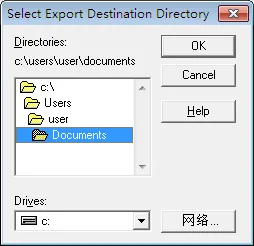
Select Export Destination Directory
Browse to your chosen location and confirm the export destination directory.
-
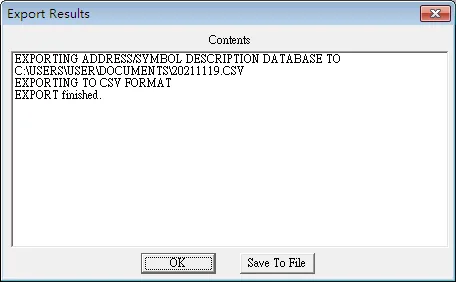
Confirm Export Results
Review the Export Results dialog to confirm the address/symbol description database was exported to CSV successfully.
-
Import Tags in EBPro (EasyBuilder Pro)
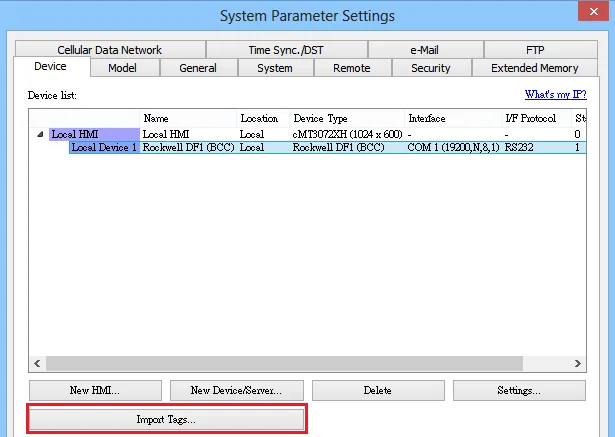
In EBPro (EasyBuilder Pro), go to System Parameter → Device. Create a Rockwell DF1 (BCC) driver, click Import Tags, then select the CSV file to import.
-
Select Tags to Import
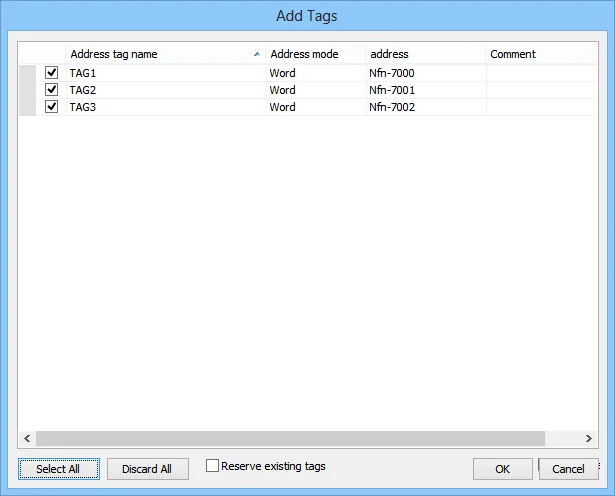
In the Add Tags dialog, select the tags to import and click OK.
-
Verify Successful Import
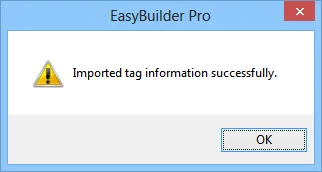
EBPro (EasyBuilder Pro) displays a confirmation dialog: Imported tag information successfully.
Wiring Diagram
NOTE: The serial port pin assignments may vary between HMI models.
Diagram 1: RS-232 (9P D-Sub to 8P Mini-DIN: MicroLogix 1000, 1100, 1200, 1400, 1500)
| HMI | Direction | PLC |
|---|---|---|
| Pin assignments | MicroLogix RS232 8P Mini-DIN Male | |
| Rx | ↔ (bidirectional) | 7 TXD |
| Tx | ↔ (bidirectional) | 4 RXD |
| GND | ↔ (bidirectional) | 2 GND |
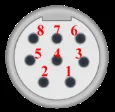
Diagram 2: RS-232 (9P D-Sub to 9P D-Sub: SLC5/03, 04, 05 CH0)
| HMI | Direction | PLC |
|---|---|---|
| Pin assignments | AB CPU CH0 RS232 9P D-Sub Female | |
| Rx | ↔ (bidirectional) | 3 TD |
| Tx | ↔ (bidirectional) | 2 RD |
| GND | ↔ (bidirectional) | 5 GND |