Introduction
All Maple Systems HMIs programmed with EBPro (EasyBuilder Pro), including every cMT X Series and cMT Series model, are compatible with Panasonic FP (Ethernet). Configure your Controller and HMI/cMT with the following parameters to establish reliable communication.
Supported Series: FP-X with AFPX-COM5
HMI Settings
| Parameters | Recommended | Options | Notes |
|---|---|---|---|
| PLC type | Panasonic FP (Ethernet) | ||
| PLC I/F | Ethernet | ||
| Port no. | 9094 | ||
| PLC sta. no. | 1 | 0~255 |
Communication Protocol
| Parameters | Recommended | Communication Efficiency |
|---|---|---|
| Protocol | Multi-read, with registration | Excellent |
| Protocol | Single read | Good |
NOTE: Multi-read protocol only supports the communication between a single HMI and PLC.
Device Address
| Bit/Word | Device | Format | Range | Memo |
|---|---|---|---|---|
| B | X | DDDDh | 0 ~ 9999f | Input (X) |
| B | Y | DDDDh | 0 ~ 9999f | Output (Y) |
| B | R | DDDDh | 0 ~ 9999f | Internal Relay (R) |
| B | L | DDDD | 0 ~ 9999 | Link Relay (L) |
| B | L_Bit | DDDDh | 0 ~ 9999f | |
| B | T | DDDD | 0 ~ 9999 | Timer (T) |
| B | C | DDDD | 0 ~ 9999 | Counter (C) |
| W | SV | DDDD | 0 ~ 9999 | Timer/Counter Set Value (SV) |
| W | EV | DDDDD | 0 ~ 65535 | Timer/Counter Elapse Value |
| W | DT | DDDDD | 0 ~ 99999 | Data Register (DT) |
| W | LD | DDDD | 0 ~ 8447 | Link Register (LD) |
| W | WX | DDDD | 0 ~ 9999 | Input (WX) (read only) |
| W | WY | DDDD | 0 ~ 9999 | Output (WY) |
| W | WR | DDDDD | 0 ~ 20480 | Internal Relay (WR) |
| W | WL | DDDD | 0 ~ 9999 | Link Relay (WL) |
| W | FL | DDDDD | 0 ~ 99999 | File Register (FL) |
Import Tag
Export CSV file from FPWIN Pro 7
In FPWIN Pro 7, go to Project → Export → Variables as CSV file → All project variables.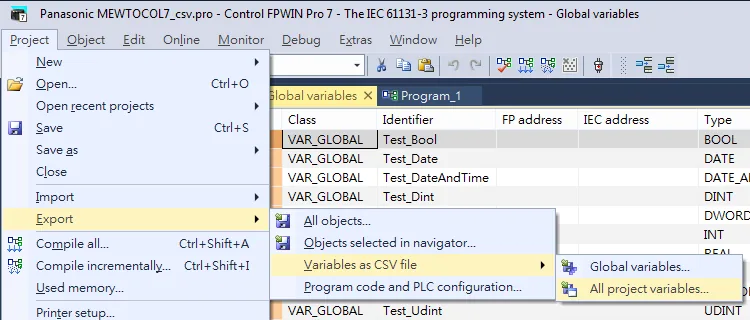
Import tags in EBPro (EasyBuilder Pro)
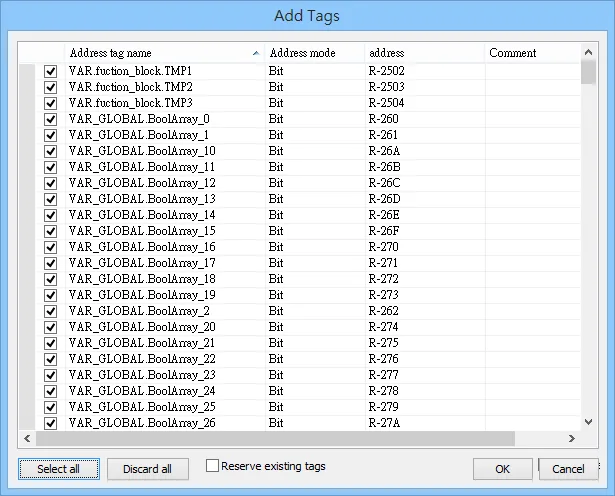
Open EBPro (EasyBuilder Pro), go to System Parameter, select your Panasonic FP (Ethernet) device, then click Import Tags.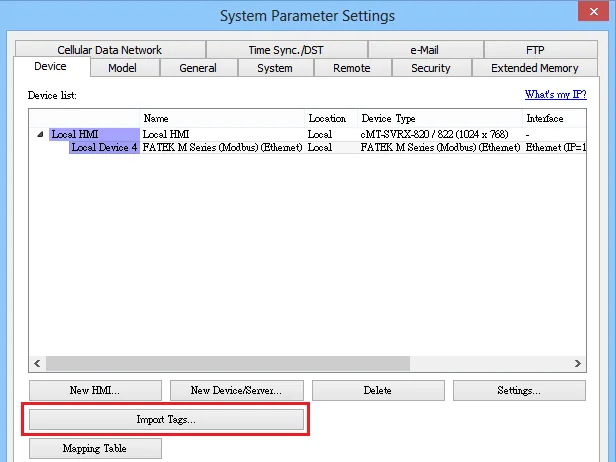
Wiring Diagram
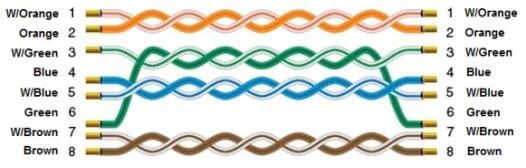
NOTE: Ethernet connection on TCP port 9094 via the FP-X (AFPX-COM5) port.
The diagram below shows the Ethernet cable wiring.