Introduction
All Maple Systems HMIs programmed with EBPro (EasyBuilder Pro), including every cMT X Series and cMT Series model, are compatible with ABB EtherNet/IP (Implicit Messaging). Configure your Controller and HMI/cMT with the following parameters to establish reliable communication.
Supported Series: ABB EtherNet/IP (Implicit Messaging)
HMI Setting
| Parameters | Recommended | Options | Notes |
|---|---|---|---|
| PLC type | ABB EtherNet/IP (Implicit Messaging) | ||
| PLC I/F | Ethernet | ||
| Port no. | 44818 | ||
| Assembly instance | Input: 101 Output: 111 | Input: 101~106 Output: 111~116 | |
| Mode | Anybus Adapter (IRC5-DSQC669) | Anybus Adapter (IRC5-DSQC669) EIP Adapter (IRC5-DSQC10XX) | |
| Online simulator | YES |
Device Address
| Bit/Word | Device type | Format | Range |
|---|---|---|---|
| B | Input_Bit | DDDdd | 0 ~ 51215 |
| B | Output_Bit | DDDdd | 0 ~ 51215 |
| B | Input | DDD | 0 ~ 512 |
| B | Output | DDD | 0 ~ 512 |
Application Example
ABB robot’s parameter settings are very flexible; almost all of its functions can be performed through communication with HMI. The below is a list showing how ABB robot’s parameters map to HMI function. Contents in this mapping list are all user-defined. This list shows that HMI can directly control the robot to accomplish miscellaneous tasks, while at the same time allowing users to monitor robot status.
Sample Robot I/O List
| Parameters | Input Address | Output Address | Format | Bit | HMI Function |
|---|---|---|---|---|---|
| Start At Main | 0 | Bool | 1 | Start Button | |
| Servo On | 1 | Bool | 1 | Start Button | |
| Product to be Produced | 2–17 | Word | 16 | Product Selection Button (1~16) | |
| Reserved Variable 1 | 18–33 | Word | 16 | Reserved Variable | |
| Coordinate Offset 1 | 34–65 | Float | 32 | Offset (e.g. -3.734mm) | |
| Task Executing | 0 | Bool | 1 | Status: In Operation | |
| Auto On | 1 | Bool | 1 | Status: In Auto. Mode | |
| Production in Progress #1~#16 | 2~17 | Word | 16 | Status: Product No. in Production | |
| Robot’s Reserved Variable 1 | 18~33 | Word | 16 | Reserved Variable 1 (e.g. Production is OK/NG) | |
| Robot’s Reserved Variable 2 | 34~49 | Word | 16 | Reserved Variable 2 (e.g. Extend the time for 217 seconds) |
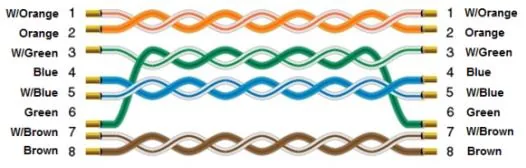
Wiring Diagram
The diagram below shows the Ethernet cable wiring.