Introduction
All Maple Systems HMI touch screens programmed with EBPro (EasyBuilder Pro), including every cMT X Series and cMT Series model, are compatible with Haiwell PLC (Ethernet). Configure your Controller and HMI/cMT with the following parameters to establish reliable communication.
Support Series: Haiwell A Series, C series, T Series, H Series, N Series, S Series PLC
Website: www.haiwell.com
HMI Settings
| Parameter | Recommended | Options | Notes |
|---|---|---|---|
| PLC type | Haiwell PLC (Ethernet) | ||
| PLC I/F | Ethernet | ||
| Port no. | 502 | ||
| EasyAccess 2.0 Pass Through | YES |
Communication requires a good environment. If the ping value is too high, EasyAccess 2.0 pass through may not be successful.
Device Address
| Bit/Word | Device Type | Format | Range | Description |
|---|---|---|---|---|
| B | X | DDDD | 0 ~ 1023 | Input Switch |
| B | Y | DDDD | 0 ~ 1023 | Output Switch |
| B | M | DDDDD | 0 ~ 12287 | Internal Relay |
| B | T | DDDD | 0 ~ 1023 | Timer (Output Coil State) |
| B | C | DDD | 0 ~ 255 | Counter (Output Coil State) |
| B | SM | DDD | 0 ~ 215 | System Status Bit |
| B | S | DDDD | 0 ~ 2047 | Step Bit |
| W | CR | DDD | 0 ~ 255 | Special Module Parameter Register |
| W | AI | DDD | 0 ~ 255 | Analog Input Register |
| W | AQ | DDD | 0 ~ 255 | Analog Output Register |
| W | V | DDDDD | 0 ~ 14847 | Data Register |
| W | TCV | DDDD | 0 ~ 1023 | Timer (Current Value Register) |
| W | CCV | DDD | 0 ~ 255 | Counter (Current Value Register) |
| W | SV | DDD | 0 ~ 900 | System Register |
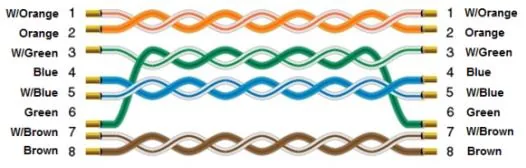
Wiring Diagram
NOTE: Use a standard straight-through Ethernet cable to connect the HMI to the Haiwell PLC.
The diagram below shows the Ethernet cable wiring.