Introduction
All Maple Systems HMIs programmed with EBPro (EasyBuilder Pro), including every cMT X Series and cMT Series model, are compatible with Siemens LOGO! Ethernet. Configure your Controller and HMI/cMT with the following parameters to establish reliable communication.
Supported Series: Siemens LOGO! 0BA0, 0BA1, 0BA2, 0BA7, 0BA8
HMI Setting
| Parameters | Recommended | Options | Notes |
|---|---|---|---|
| PLC type | Siemens LOGO (Ethernet) | ||
| PLC I/F | Ethernet | ||
| Port no. | 102 | ||
| PLC sta. no. | 1 | 1~99 | |
| Model | 0BA7 | 0BA7, 0BA8, 0BA0 / 0BA1 | 0BA2 model *Note1 |
| Local TSAP | 1000 | Must be greater than 1000 | |
| Remote TSAP | 2100 | Range: 2000~2700 |
NOTE: For TSAP settings please refer to PLC Setting below.
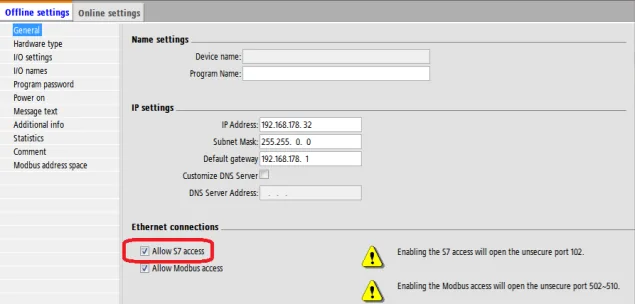
*Note1: 0BA2 model selects allow S7 access service and can also use 0BA0/0BA1 model for communication.
PLC Setting
Siemens LOGO! multi connection setting requires LOGO! Soft Comfort software to set PLC to identify the connected devices. The following introduces LOGO! Soft Comfort settings.
Open Ethernet Connections
In LOGO! Soft Comfort, go to Tools → Ethernet Connections.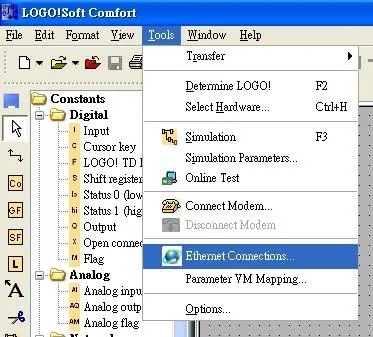
Add Ethernet Connection
Right-click on Ethernet Connections and click Add connections to add a connection. Up to eight connections are allowed.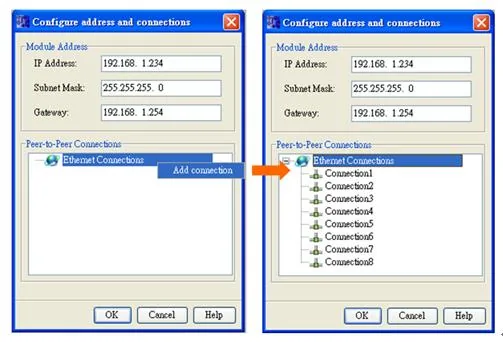
Configure Server Connection
Double-click on Connection1, then select Server Connection. Local TSAP is system default and cannot be modified. Tick Accept all connection requests to connect to any IP. Set Remote TSAP to10.00. Connection 2~8 can all be set as above.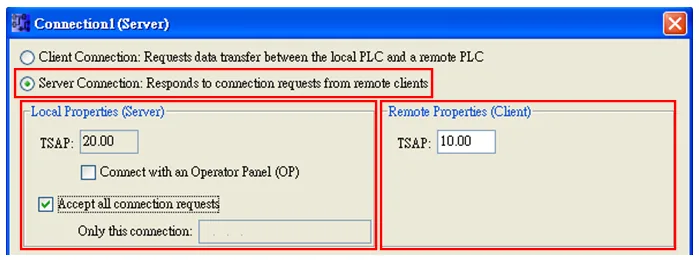
Download Connection to PLC
Complete settings and download the connection to the Siemens LOGO!.The value of Local TSAP and Remote TSAP must be set oppositely in EasyBuilder for communication.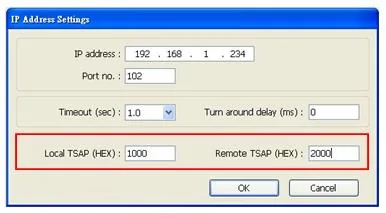
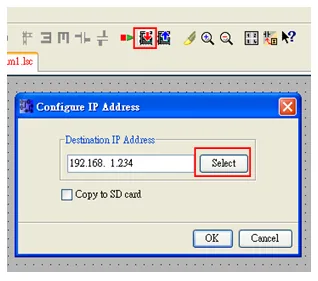
Device Address
| Bit/Word | Device Type | Format | Range | Memo |
|---|---|---|---|---|
| B | I | DD | 1~64 | Read Only |
| B | Q | DD | 1~64 | |
| B | M | DD | 1~112 | |
| B | NI | DDD | 1~128 | |
| B | NQ | DDD | 1~128 | |
| B | V | DDDDo | 0~14697 | VW_Bit |
| W | AI | D | 1~16 | |
| W | AQ | D | 1~16 | |
| W | AM | DD | 1~64 | |
| W | NAI | DD | 1~64 | |
| W | NAQ | DD | 1~32 | |
| W | VW | DDDD | 0~1468 | See Table 1 & 2 Address Mapping |
| DW | VD | DDDD | 0~1466 | |
| Byte | VB | DDDD | 0~1466 | |
| W | RTC | D | 1~7 |
Table 1 Address Mapping (LOGO! 0BA7)
| I | VW | Q | VW | M | VW | AI | VW | AQ | VW | AM | VW |
|---|---|---|---|---|---|---|---|---|---|---|---|
| I1 | V923.0 | Q1 | V942.0 | M1 | V948.0 | AI1 | VW926 | AQ1 | VW944 | AM1 | VW952 |
| I2 | V923.1 | Q2 | V942.1 | M2 | V948.1 | AI2 | VW928 | AQ2 | VW946 | AM2 | VW954 |
| I3 | V923.2 | Q3 | V942.2 | M3 | V948.2 | AI3 | VW930 | AM3 | VW956 | ||
| I4 | V923.3 | Q4 | V942.3 | M4 | V948.3 | AI4 | VW932 | AM4 | VW958 | ||
| I5 | V923.4 | Q5 | V942.4 | M5 | V948.4 | AI5 | VW934 | AM5 | VW960 | ||
| I6 | V923.5 | Q6 | V942.5 | M6 | V948.5 | AI6 | VW936 | AM6 | VW962 | ||
| I7 | V923.6 | Q7 | V942.6 | M7 | V948.6 | AI7 | VW938 | AM7 | VW964 | ||
| I8 | V923.7 | Q8 | V942.7 | M8 | V948.7 | AI8 | VW940 | AM8 | VW966 | ||
| I9 | V924.0 | Q9 | V943.0 | M9 | V949.0 | AM9 | VW968 | ||||
| I10 | V924.1 | Q10 | V943.1 | M10 | V949.1 | AM10 | VW970 | ||||
| I11 | V924.2 | Q11 | V943.2 | M11 | V949.2 | AM11 | VW972 | ||||
| I12 | V924.3 | Q12 | V943.3 | M12 | V949.3 | AM12 | VW974 | ||||
| I13 | V924.4 | Q13 | V943.4 | M13 | V949.4 | AM13 | VW976 | ||||
| I14 | V924.5 | Q14 | V943.5 | M14 | V949.5 | AM14 | VW978 | ||||
| I15 | V924.6 | Q15 | V943.6 | M15 | V949.6 | AM15 | VW980 | ||||
| I16 | V924.7 | Q16 | V943.7 | M16 | V949.7 | AM16 | VW982 | ||||
| I17 | V925.0 | M17 | V950.0 | ||||||||
| I18 | V925.1 | M18 | V950.1 | ||||||||
| I19 | V925.2 | M19 | V950.2 | ||||||||
| I20 | V925.3 | M20 | V950.3 | ||||||||
| I21 | V925.4 | M21 | V950.4 | ||||||||
| I22 | V925.5 | M22 | V950.5 | ||||||||
| I23 | V925.6 | M23 | V950.6 | ||||||||
| I24 | V925.7 | M24 | V950.7 | ||||||||
| M25 | V951.0 | ||||||||||
| M26 | V951.1 | ||||||||||
| M27 | V951.2 |
Table 2 Address Mapping (LOGO! 0BA0, 0BA8)
| Device Type | VM (From) | VM (To) | Range |
|---|---|---|---|
I | 1024 | 1031 | 8 Bytes |
AI | 1032 | 1063 | 32 Bytes |
Q | 1064 | 1071 | 8 Bytes |
AQ | 1072 | 1103 | 32 Bytes |
M | 1104 | 1117 | 14 Bytes |
AM | 1118 | 1245 | 128 Bytes |
NI | 1246 | 1261 | 16 Bytes |
NAI | 1262 | 1389 | 128 Bytes |
NQ | 1390 | 1405 | 16 Bytes |
NAQ | 1406 | 1469 | 64 Bytes |
Wiring Diagram
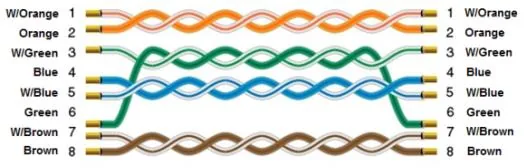
The diagram below shows the Ethernet cable wiring.