Introduction
All Maple Systems HMIs programmed with EBPro (EasyBuilder Pro), including every cMT X Series and cMT Series model, are compatible with Schneider Electric M340/M580 Series (Symbolic Addressing) (Ethernet). Configure your Controller and HMI/cMT with the following parameters to establish reliable communication.
Supported Series: Schneider M340/M580 series (Support firmware v2.70 or later)
Website: www.schneider-electric.com
HMI Settings
| Parameters | Recommended | Options | Notes |
|---|---|---|---|
| PLC type | Schneider M340/M580 Series (Symbolic Addressing) (Ethernet) | ||
| PLC I/F | Ethernet | ||
| Port no. | 502 |
PLC Settings
| Setting | Value | Notes |
|---|---|---|
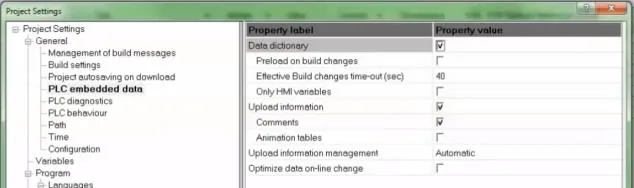
| Data dictionary | Enable |
Tools → Project Settings → PLC embedded data → Activate the Data Dictionary
Support Device Type
| Data Type | EBPro (EasyBuilder) Data Format | Memo |
|---|---|---|
| BOOL | bit | *Note1 |
| EBOOL | bit | *Note1 |
| BYTE | 16-bit BCD, Hex, Binary, Unsigned | 8-bit |
| DATE | 32-bit BCD, Hex, Binary, Unsigned | 32-bit |
| DINT | 32-bit BCD, Hex, Binary, Signed | 32-bit |
| DWORD | 32-bit BCD, Hex, Binary, Unsigned | 32-bit |
| INT | 16-bit BCD, Hex, Binary, Signed | 16-bit |
| REAL | 32-bit Float | 32-bit |
| STRING | ASCII input and ASCII display | |
| TIME | 32-bit BCD, Hex, Binary, Unsigned | 32-bit |
| TOD | 32-bit BCD, Hex, Binary, Unsigned | 32-bit |
| UDINT | 32-bit BCD, Hex, Binary, Unsigned | 32-bit |
| UINT | 16-bit BCD, Hex, Binary, Unsigned | 16-bit |
| WORD | 16-bit BCD, Hex, Binary, Unsigned | 16-bit |
NOTE: *Note1: Mapping ebool type to external IO may cause unknown communication errors. It is recommended to use bool type for mapping.
Support Tables
- Variables table
- Derived data types table
- Structure
- Array (Supported one dimension)
- Array data structure
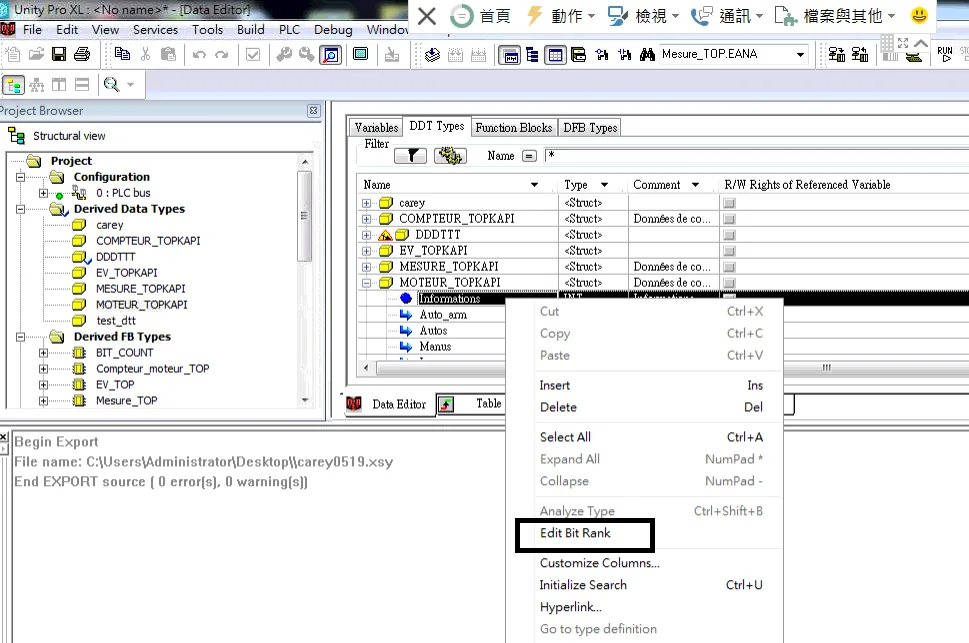
NOTE: [Edit Bit Rank] The generated address is not supported.
How to Import Tags
Export file from PLC software
In Unity Pro XL, right-click the project variables and select Export to generate an*.XSYfile.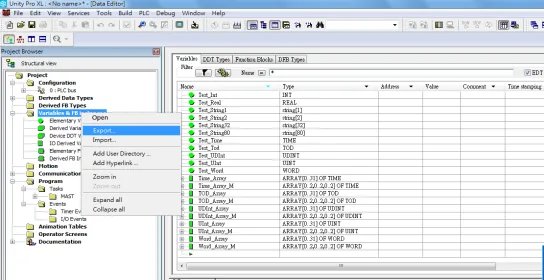
Open Import Tags in EBPro (EasyBuilder Pro)
In EBPro (EasyBuilder Pro), open System Parameter Settings, select the Schneider M340/M580 device, and click Import Tags…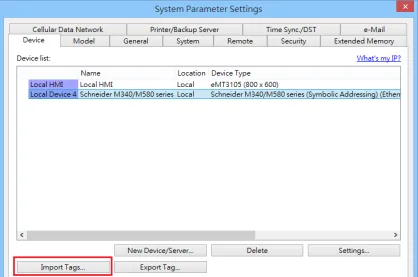
Select file format to import
In the Import Tags dialog, select *Import Files (.XSY) with type Hierarchical, then click OK**.nnIn Unity Pro XL, select [Tools] → [Project Settings] → [PLC embedded data] → [Use data dictionary] before exporting.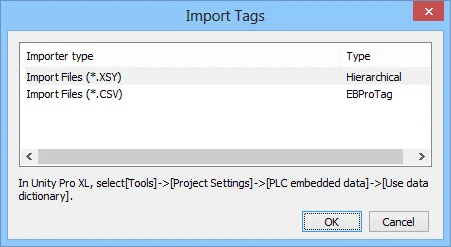
Confirm import results
EBPro (EasyBuilder Pro) displays a confirmation dialog when the tag import completes successfully.
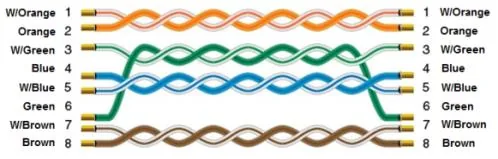
Wiring Diagram
The diagram below shows the Ethernet cable wiring.