Introduction
All Maple Systems HMIs programmed with EBPro (EasyBuilder Pro), including every cMT X Series and cMT Series model, are compatible with Beckhoff ADS/AMS (Ethernet). Configure your Controller and HMI/cMT with the following parameters to establish reliable communication.
Supported Series: Twincat
HMI Settings
| Parameters | Recommended | Options | Notes |
|---|---|---|---|
| PLC type | Beckhoff ADS/AMS (Ethernet) | ||
| PLC I/F | Ethernet | ||
| Port no. | 48898 | ||
| ADS port | 801 | 801, 811, 821, 831 | |
| PLC sta. no. | 1 |
PLC Settings
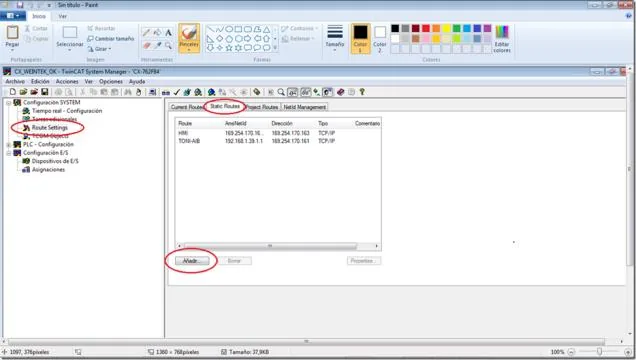
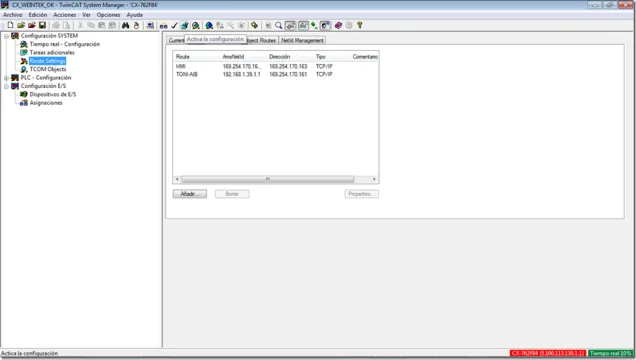
In TwinCAT System Manager, while connected to the PLC, click on [Route Settings] and in the [Static Routes] subwindow press [Add].
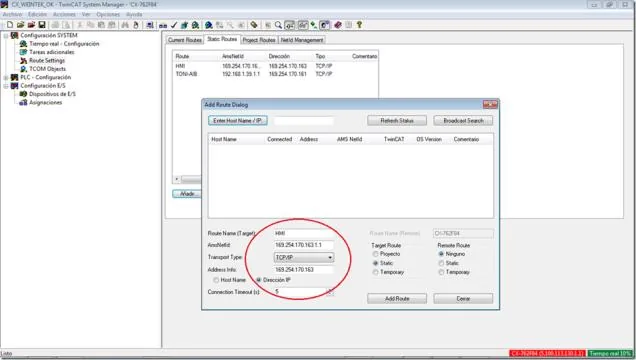
A new window will appear in which you must enter the following data:
- Route Name:
HMIorTP, or any name you prefer — it has no greater importance. - AMSNetID: The IP of the HMI followed by
.1.1— for example,169.254.170.163.1.1 - Transport Type:
TCP/IP - Address Info: The IP of the HMI — for example,
169.254.170.163 - Check Box: IP address
- Click [Add Route]
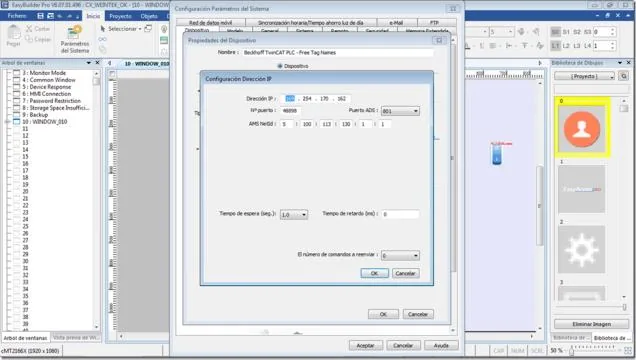
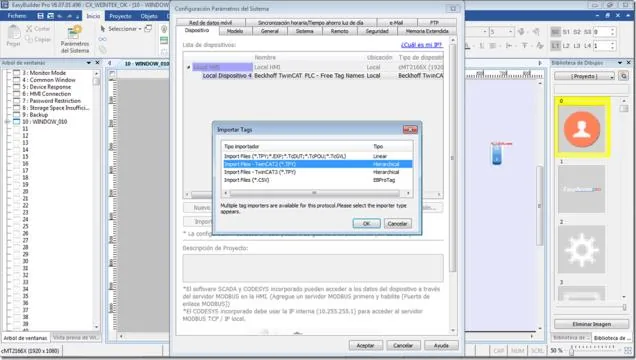
In EBPro (EasyBuilder Pro), configure communication with the PLC using the PLC’s IP address and AMS NetID, then import the tags. In this example the PLC has IP 169.254.170.162 and AMS NetID 5:100:113:130:1:1.
Once you verify that everything works correctly, in TwinCAT System Manager activate the configuration on the PLC by pressing the Rubik’s cube button or via [Actions] > [Save in record…]. If this step is not completed, the PLC configuration is lost — the HMI route address you entered will not be saved to persistent memory.
Device Address
| Bit/Word | Device Type | Format | Range | Memo |
|---|---|---|---|---|
| B | IX | DDDDDo | 0 ~ 655357 | o : Bit no. (0 ~ 7) |
| B | QX | DDDDDo | 0 ~ 655357 | o : Bit no. (0 ~ 7) |
| B | MX | DDDDDo | 0 ~ 655357 | o : Bit no. (0 ~ 7) |
| W | IW | DDDDD | 0 ~ 65535 | |
| W | QW | DDDDD | 0 ~ 65535 | |
| W | MW | DDDDD | 0 ~ 65535 | |
| DW | ID | DDDDD | 0 ~ 65535 | |
| DW | QD | DDDDD | 0 ~ 65535 | |
| DW | MD | DDDDD | 0 ~ 65535 |
Support Device Type
| Data Type | EBPro (EasyBuilder) Data Format | Memo |
|---|---|---|
| Bool | bit | |
| Word | 16-bit BCD, Hex, Binary, Unsigned | 16-bit |
| Int | 16-bit BCD, Hex, Binary, Signed | 16-bit |
| UInt | 16-bit BCD, Hex, Binary, Unsigned | 16-bit |
| DWord | 32-bit BCD, Hex, Binary, Unsigned | 32-bit |
| DInt | 32-bit BCD, Hex, Binary, Signed | 32-bit |
| Real | 32-bit Float | 32-bit |
| UDInt | 32-bit BCD, Hex, Binary, Unsigned | 32-bit |
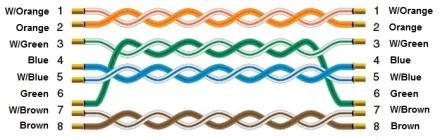
Wiring Diagram
The diagram below shows the Ethernet cable wiring.