Introduction
All Maple Systems HMIs programmed with EBPro (EasyBuilder Pro), including every cMT X Series and cMT Series model, are compatible with Schneider Electric PowerLogic Modbus TCP/IP. Configure your Controller and HMI/cMT with the following parameters to establish reliable communication.
Supported Series: Schneider PowerLogic Modbus TCP/IP
HMI Setting
| Parameters | Recommended | Options | Notes |
|---|---|---|---|
| PLC type | Schneider PowerLogic Modbus TCP/IP | ||
| PLC I/F | Ethernet | ||
| Port no. | 502 | ||
| PLC sta. no. | 1 |
Device Address
| Bit/Word | Device type | Format | Range | Memo |
|---|---|---|---|---|
| B | 0x | DDDDD | 1 ~ 65535 | Output bit |
| B | 1x | DDDDD | 1 ~ 65535 | Input bit (read only) |
| B | 3x_Bit | DDDDDdd | 100 ~ 6553515 | Input Register bit (read only) |
| B | 4x_Bit | DDDDDdd | 100 ~ 6553515 | Output Register bit |
| B | 0x_multi_coils | DDDDD | 1 ~ 65535 | Write multiple coils |
| W | 3x | DDDDD | 1 ~ 65535 | Input Register (read only) |
| W | 4x | DDDDD | 1 ~ 65535 | Output Register |
| DW | 5x | DDDDD | 1 ~ 65535 | 4x double word swap |
| W | 6x | DDDDD | 1 ~ 65535 | 4x single word write |
| W | UMod10_4_ASCII | DDDDDDD | 100 ~ 6553500 | Read 64 bits unsigned data |
| W | UMod10_3_ASCII | DDDDDDD | 100 ~ 6553500 | Read 48 bits unsigned data |
| W | Mod10_2 | DDDDD | 1 ~ 65535 | Read 32 bits data |
| W | UINT64_ASCII | DDDDDDD | 100 ~ 6553500 | Read 64 bits unsigned data |
| W | Mod10_4_ASCII | DDDDDDD | 100 ~ 6553500 | Read 64 bits signed data |
| W | Mod10_3_ASCII | DDDDDDD | 100 ~ 6553500 | Read 48 bits signed data |
| W | INT64_ASCII | DDDDDDD | 100 ~ 6553500 | Read 64 bits signed data |
NOTE: Use the driver “Schneider PowerLogic Modbus RTU” to access extra data types beyond standard Modbus types. Because 64-bit objects are not natively supported by numeric objects, use ASCII objects to display them.
You can treat Mod10_2 as any other normal address because it is also 32-bit data. However, when using ASCII types, be aware of the special addressing method and the length of memory allocation.
Addressing Method
It is necessary to add a suffix of 00. For example, to read register 1716 [Energy, Real Total] in PM800, address it as 171600.
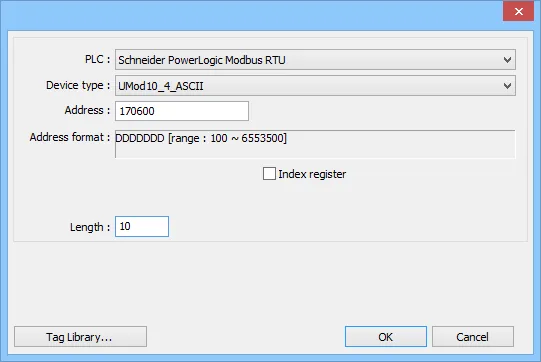
Length of Memory Allocation
When using ASCII, it is necessary to specify the length — that is, the number of word memory. Each WORD holds two characters. For example, a length of 10 allows a maximum of 20 characters for the object (including the negative sign). Adjust this parameter according to the expected data.
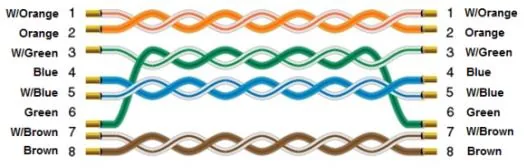
Wiring Diagram
The diagram below shows the Ethernet cable wiring.