
Introduction
All Maple Systems HMIs programmed with EBPro (EasyBuilder Pro), including every cMT X Series and cMT Series model, are compatible with a Mitsubishi A1S/A2N. Configure your Controller and HMI/cMT with the following parameters to establish reliable communication.
Supported Series: Mitsubishi A1S/A2N
HMI Setting
| Parameters | Recommended | Options | Notes |
|---|---|---|---|
| PLC type | Mitsubishi A1S/A2N | ||
| PLC I/F | RS232 | ||
| Baud rate | 9600 | ||
| Data bits | 8 | ||
| Parity | Odd | ||
| Stop bits | 1 | ||
| PLC sta. no. | 0 | ||
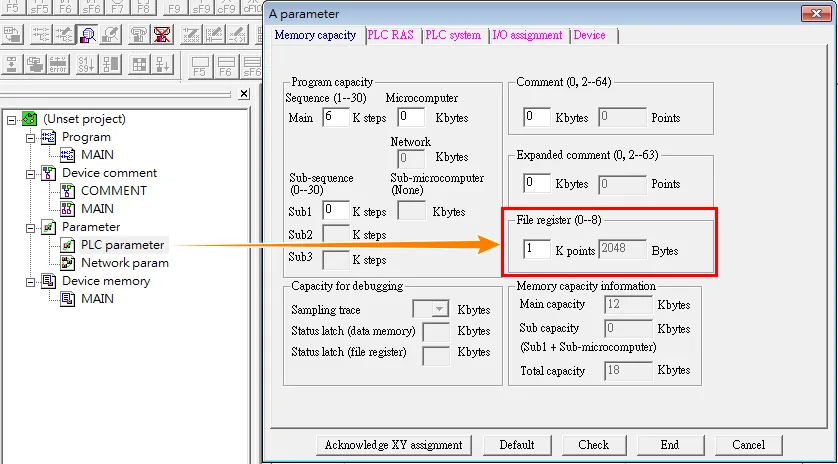
| File register | 0 | 0 ~ 8 | *Note |
NOTE: Parameter → Memory capacity → File register
Device Address
| Bit/Word | Device | Format | Range | Memo |
|---|---|---|---|---|
| B | X | HHHH | 0 ~ ffff | Input Relay |
| B | Y | HHHH | 0 ~ ffff | Output Relay |
| B | M | DDDDD | 0 ~ 65535 | Auxiliary Relay |
| B | B | HHHH | 0 ~ ffff | |
| B | F | DDDDD | 0 ~ 65535 | |
| W | TV | DDDDD | 0 ~ 65535 | Timer Memory |
| W | CV | DDDDD | 0 ~ 65535 | Counter Memory |
| W | D | DDDDD | 0 ~ 65535 | Data Register |
| W | W | HHHH | 0 ~ ffff | |
| W | R | DDDDD | 0 ~ 65535 |
Pass-through
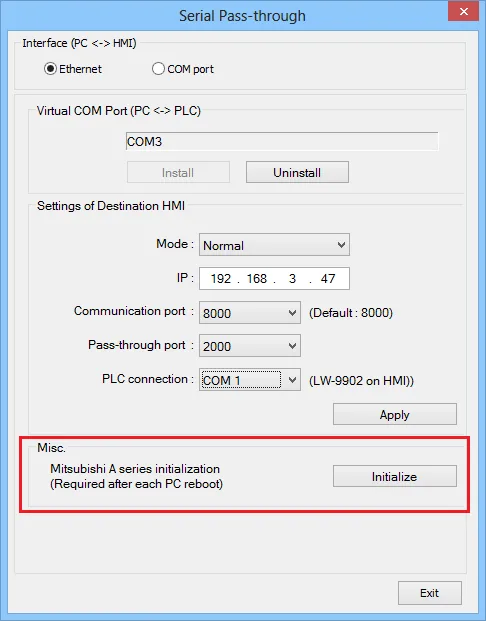
When the PC reboots or virtual com port is reinstalled, it needs to be re-initialized for pass-through.
Wiring Diagrams
NOTE: Due to hardware limitations, this PLC is not supported by HMI models without RTS/CTS.
Use the RS422 to RS232 PLC programming cable (shown as follows).
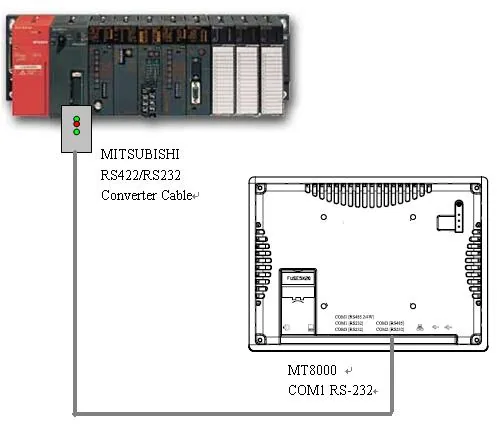
NOTE: The serial port pin assignments may vary between HMI models.
Diagram 1: RS-232
| HMI | PLC Programming | Converter | PLC |
|---|---|---|---|
| Pin assignments | RS422 25P D-Sub Male | ||
| Rx | TX | TX+ | 2 RX+ |
| Tx | RX | RX+ | 3 TX+ |
| GND | GND | DTR+ | 4 DSR+ |
| RTS | CTS | GND | 7 GND |
| CTS | RTS | TX- | 15 RX- |
| RX- | 16 TX- | ||
| DTR- | 17 DSR- |
Diagram 2: RS485-4W cMT-G01, cMT-G02, cMT-SVR-100/200, cMT-FHDX-820, cMT-SVRX-820 connection guide
| HMI | Direction | PLC |
|---|---|---|
| Pin assignments | A Series PLC CPU 25 pin RS485-4W | |
| 8 TX+ | ↔ (bidirectional) | 2 RX+ |
| 9 TX- | ↔ (bidirectional) | 15 RX- |
| 6 RX+ | ↔ (bidirectional) | 3 TX+ |
| 7 RX- | ↔ (bidirectional) | 16 TX- |
| 1 Data+ | ↔ (bidirectional) | 4 CTS+ |
| 4 Data- | 17 CTS- | |
| 5 GND | 7 GND | |
| 20 21 Short |