Introduction
All Maple Systems HMIs programmed with EBPro (EasyBuilder Pro), including every cMT X Series and cMT Series model, are compatible with Fatek M Series (Modbus) (Ethernet). Configure your Controller and HMI/cMT with the following parameters to establish reliable communication.
Supported Series: FATEK M Series
Website: http://www.fatek.com/
HMI Setting
| Parameters | Recommended | Options | Notes |
|---|---|---|---|
| PLC type | FATEK M Series (Modbus) (Ethernet) | ||
| PLC I/F | Ethernet | ||
| Port no. | 502 |
Device Address
| Bit/Word | Device type | Format | Range | Memo |
|---|---|---|---|---|
| B | X | DDDD | 0 ~ 1023 | |
| B | Y | DDDD | 0 ~ 1023 | |
| B | M | DDDDD | 0 ~ 29599 | |
| B | S | DDDD | 0 ~ 3103 | |
| B | T | DDDD | 0 ~ 1023 | |
| B | C | DDDD | 0 ~ 1279 | |
| B | R_Bit | DDDDDdd | 0 ~ 4731915 | |
| B | D_Bit | DDDDDdd | 0 ~ 1199915 | |
| W | WX | DDDD | 0 ~ 1023 | |
| W | WY | DDDD | 0 ~ 1023 | |
| W | WM | DDDDD | 0 ~ 29599 | |
| W | WS | DDDD | 0 ~ 3103 | |
| W | RT | DDDD | 0 ~ 1023 | |
| W | RC | DDDD | 0 ~ 1023 | |
| DW | LC | DDDD | 1024 ~ 1279 | |
| W | R | DDDDD | 0 ~ 47319 | |
| W | D | DDDDD | 0 ~ 11999 |
Import Tags
Export Global Tag CSV
After the Global Tag is added in the UpperLogic software, click the Export button to export the*.csvfile.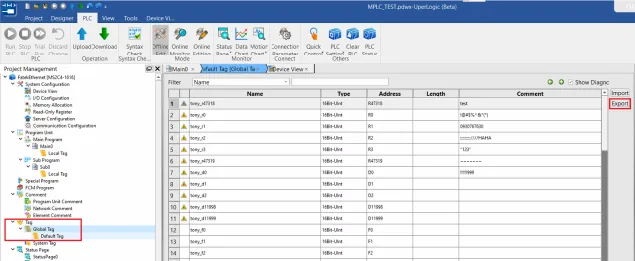
Add FATEK Driver and Import Tags
In EBPro (EasyBuilderPro), add the FATEK M Series driver, then press the Import Tags button in the System Parameter Settings dialog.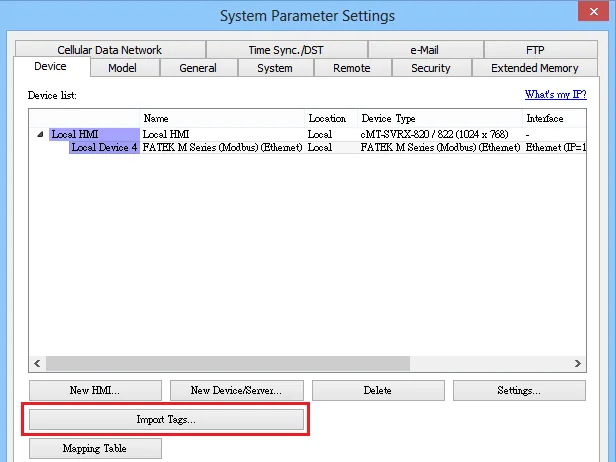
Select CSV File to Import
Browse to and select the exported*.csvfile. If the project has been imported before, choose whether to Remove old tags or Replace the existing tags with the new ones.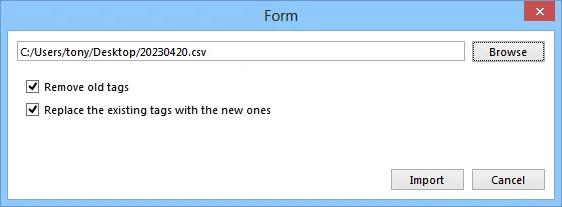
Select Tags and Confirm
Click Select All to select all tags to import, or individually select the tags to be imported, then click OK.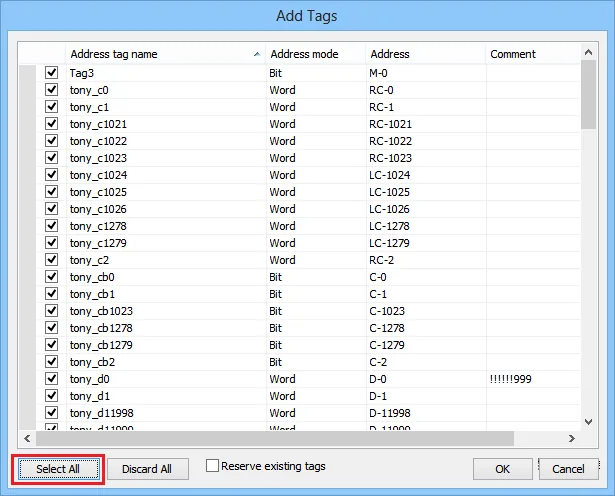
Wiring Diagram
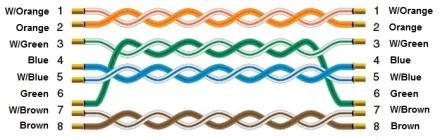
NOTE: Connect the HMI to the FATEK M Series PLC using a standard Ethernet cable (straight-through, Cat5e or higher).
The diagram below shows the Ethernet cable wiring.