
Introduction
All Maple Systems HMIs programmed with EBPro (EasyBuilder Pro), including every cMT X Series and cMT Series model, are compatible with a Barcode Scanner/Keyboard. Configure your Controller and HMI/cMT with the following parameters to establish reliable communication.
HMI Setting
| Parameters | Recommended | Options | Notes |
|---|---|---|---|
| PLC type | Barcode Scanner/Keyboard | ||
| PLC I/F | RS232 | RS232/485, USB | |
| Baud rate | 9600 | 9600~115200 | |
| Data bits | 8 | 7, 8 | |
| Parity | None | None, Even, Odd | |
| Stop bits | 1 | 1, 2 | |
| Terminator | CR/LF | CR/LF, STX/ETX, Other, None |
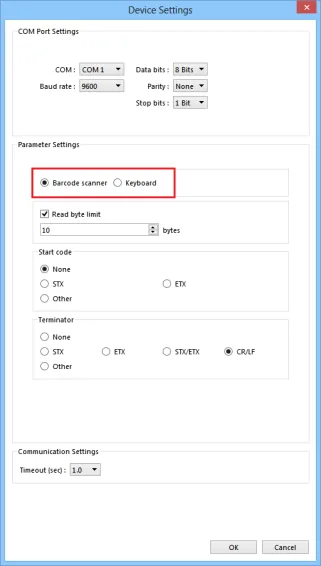
NOTE: When setting device properties, select [Barcode scanner] or [Keyboard] mode.
Device Address
| Bit/Word | Device type | Format | Range | Memo |
|---|---|---|---|---|
| B | FLAG | DD | 0 ~ 17 | Flag |
| B | RESET | O | 0 | *Note 1 |
| B | CONNECT_STATUS | O | 0 | |
| W | BARCODE | DD | 0 | Length *Note 2 |
| W | BARCODE | DD | 1 ~ 511 | Data *Note 2 |
| W | RESULT | D | 0 | *Note 3 |
1. RESET: If set on, clears the data of BARCODE and RESULT, and clears FLAG to OFF.
2. BARCODE 0: Number of bytes currently read.
BARCODE 1 ~ n: Stores the data read.
3. RESULT: Indicates the result of data reading. The following values indicate:
- 0 : Waiting to read
BARCODE. - 1 :
BARCODEis successfully read. - 2 : Invalid
BARCODEformat. - 3 : Exceeds the number of bytes specified in [Read byte limit].
- 4 : The Start Code of the data read does not match the setting.
- 5 : The Terminator of the data read does not match the setting.
Wiring Diagram
NOTE: The serial port pin assignments may vary between HMI models.
RS-232
| HMI | Direction | PLC |
|---|---|---|
| Pin assignments | RS232 9P D-Sub Female | |
| Rx | ↔ (bidirectional) | TXD |
| Tx | ↔ (bidirectional) | RXD |
| GND | ↔ (bidirectional) | GND |