Introduction
All Maple Systems HMIs programmed with EBPro (EasyBuilder Pro), including every cMT X Series and cMT Series model, are compatible with a Mitsubishi MR-MQ100 (Ethernet). Configure your Controller and HMI/cMT with the following parameters to establish reliable communication.
Supported Series: Mitsubishi MR-MQ100-Ethernet
Website: http://www.mitsubishi-automation.com
HMI Setting
| Parameters | Recommended | Options | Notes |
|---|---|---|---|
| PLC type | Mitsubishi MR-MQ100 (Ethernet) | ||
| PLC I/F | Ethernet | ||
| Port no. | Set identically to the PLC setting | Advised to set port no. to 4999 | |
| Parameter1 | 1 | Network No. | |
| PLC sta. no. | 255 |
PLC Setting
Open Basic Setting
Click Basic Setting.Open Ethernet Port Setting
Select Built-in Ethernet Port Setting.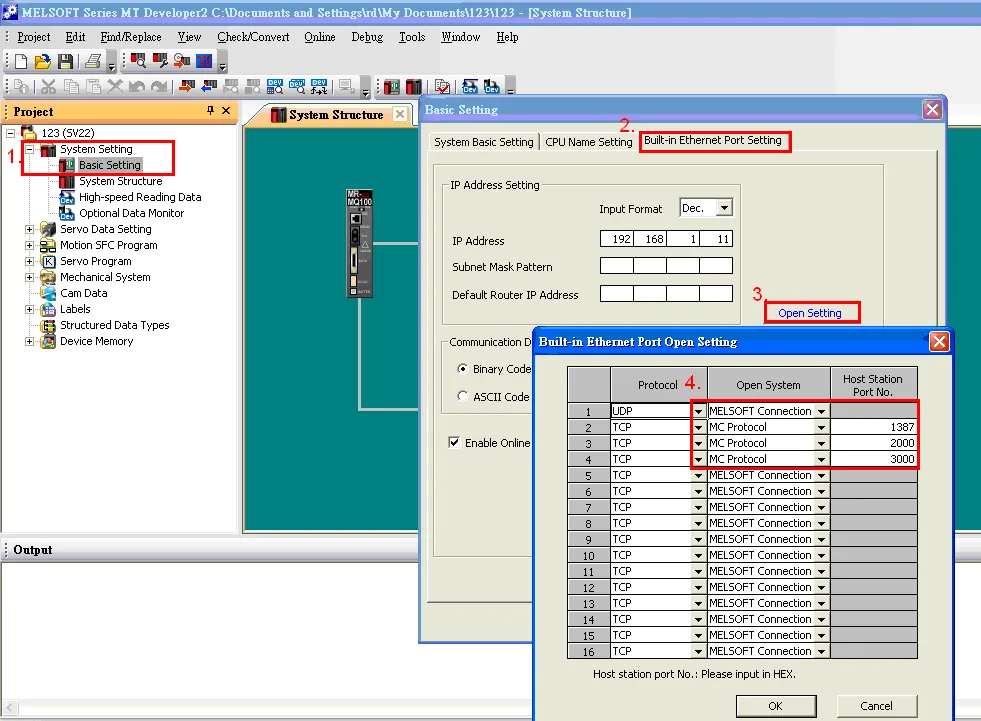
Configure Open Setting
Click Open Setting and then set the IP address and communication data code.Set MC Protocol Port
Set the MC Protocol-TCP Port No. (Hex).
Device Address
| Bit/Word | Device type | Format | Range | Memo |
|---|---|---|---|---|
| B | SM | DDDD | 0 ~ 2255 | Special Relay |
| B | X | HHHH | 0 ~ 1fff | Input |
| B | Y | HHHH | 0 ~ 1fff | Output |
| B | M | DDDDD | 0 ~ 61439 | Internal Relay |
| B | F | DDDDD | 0 ~ 32767 | Annunciator |
| B | B | HHHH | 0 ~ efff | Link Relay |
| B | D_Bit | DDDDDDDh | 0 ~ 4184063f | |
| W | SD | DDDD | 0 ~ 2255 | Special Register |
| W | D | DDDDDDD | 0 ~ 4184063 | Data Register |
| W | W | HHHHHH | 0 ~ 3fd7ff | Link Register |
| W | # | DDDDD | 0 ~ 12287 | Motion Register |
NOTE: ddd: Decimal, hhh: Hexadecimal, ooo: Octal.
Wiring Diagram
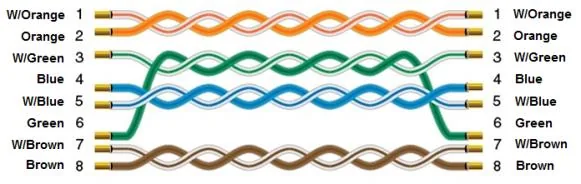
NOTE: Ethernet cable: Standard straight-through Ethernet cable.
The diagram below shows the Ethernet cable wiring.