Connection Parameters Needed for HMI/cMT Products to Communicate with IEC 61850 MMS Client using EBPro (EasyBuilder Pro)
Introduction
All Maple Systems HMIs programmed with EBPro (EasyBuilder Pro), including every cMT X Series and cMT Series model, are compatible with IEC 61850 MMS Client. Configure your Controller and HMI/cMT with the following parameters to establish reliable communication.
HMI Settings
Parameters
Recommended
Options
Notes
PLC type
IEC 61850 MMS Client
PLC I/F
Ethernet
Port no.
102
Server Parameters
Parameters
Recommended
Range or Limitation
AE invoke ID
10
0 ~ 65535
AE qualifier
12
0 ~ 65535
AP invoke ID
10
0 ~ 65535
Application ID
1.1.1.999.1
Integer less than or equal to 10
Transport selector
00 01
Maximum limit is 50 bytes
Session selector
00 01
Maximum limit is 50 bytes
Presentation selector
00 00 00 01
Maximum limit is 50 bytes
Client Parameters
Parameters
Recommended
Range or Limitation
AE invoke ID
10
0 ~ 65535
AE qualifier
12
0 ~ 65535
AP invoke ID
10
0 ~ 65535
Application ID
1.1.1.999.1
Integer less than or equal to 10
Transport selector
00 01
Maximum limit is 50 bytes
Session selector
00 01
Maximum limit is 50 bytes
Presentation selector
00 00 00 01
Maximum limit is 50 bytes
Get Tags
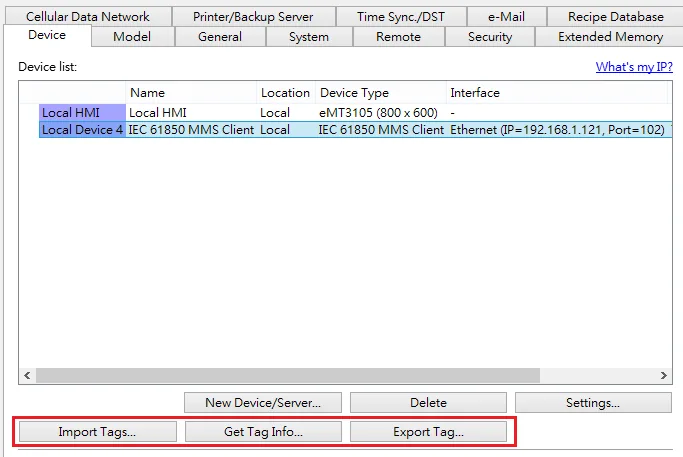
Get Tag Info: Get tag information from PLC
Export Tags: Export *.CSV file
Import Tags: Import *.CSV file
Wiring Diagram
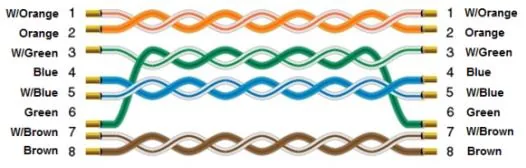
The diagram below shows the Ethernet cable wiring.