Introduction
All Maple Systems HMIs programmed with EBPro (EasyBuilder Pro), including every cMT X Series and cMT Series model, are compatible with Atlas Copco Torque Tool Open Protocol. Configure your Controller and HMI/cMT with the following parameters to establish reliable communication.
Supported Series: Torque Tool Open Protocol
HMI Settings
| Parameters | Recommended | Options | Notes |
|---|---|---|---|
| PLC type | Atlas Copco Torque Tool Open Protocol | ||
| PLC I/F | Ethernet | ||
| Port no. | 4545 |
Command Set: Alarm
| Item | Data Type | Access | Description | Object Type |
|---|---|---|---|---|
ALARM_STATUS | Boolean | Read Only | 0 if no alarm is active, 1 if an alarm is currently active.* | Bit Lamp |
ALARM_ERROR | String[2] | Read Only | Error code. | ASCII |
ALARM_C_READY | Boolean | Read Only | Controller ready status. | Bit Lamp |
ALARM_T_READY | Boolean | Read Only | Tool ready status. | Bit Lamp |
ALARM_TIME | String[10] | Read Only | Timestamp | ASCII |
ALARM_NEWDATA | Boolean | Read / Write | Set to 1 when new data arrives. Write a 0 to this flag to clear it. | Toggle Object |
*The ALARM_STATUS flag may not be available, depending on the type of alarm message received.
Command Set: Flash
| Item | Data Type | Access | Description | Object Type |
|---|---|---|---|---|
FLASH | Boolean | Write Only | Cause the green light on the tool to flash until an operator pushes a button. | Set Bit / Set On |
Command Set: Identifiers
| Item | Data Type | Access | Description | Object Type |
|---|---|---|---|---|
ID_DOWNLOAD | String[50] | Write Only | Write the identifiers to this item to send the identifiers to the controller. | Use macro and LW to write it |
ID_BYPASS | Boolean | Write Only | Bypass the next identifier expected in the work order | Set Bit / Set On |
ID_RESET | Boolean | Write Only | Reset the latest identifier or bypassed identifier in the work order. | Set Bit / Set On |
ID_RESETALL | Boolean | Write Only | Reset all identifiers in the work order | Set Bit / Set On |
MID_TYPE* | Word | Read Only | Identifier type number | Numeric |
MID_IN_ORDER* | Boolean | Read Only | Included in work order. 0 = No, 1 = Yes | Bit Lamp |
MID_STATUS* | Word | Read Only | Status in work order. 0 = Not accepted, 1 = Accepted, 2 = Bypassed, 3 = Reset. | Numeric |
MID_ID* | String[13] | Read Only | Identifier | ASCII |
MID_NEWDATA* | Boolean | Read/Write | Set to 1 when new data arrives. Write a 0 to this flag to clear it. | Toggle Object |
* These items have 4 instances (1–4). Example: MID_TYPE1 through MID_TYPE4
Command Set: Job Info
| Item | Data Type | Access | Description | Object Type |
|---|---|---|---|---|
JOB_JOBNUM | Word | Read/Write | The selected job number. To select a different job, write a job number to this item. | Numeric |
JOB_STATUS | Word | Read Only | Job batch status. 0 = Job batch not completed, 1 = Job batch OK, 2 = Job batch NOK. | Numeric |
JOB_BMODE | Word | Read Only | Job batch mode. 0 = Only the OK bolts are counted, 1 = Both the OK and the NOK bolts are counted. | Numeric |
JOB_BSIZE | Word | Read Only | Job batch size. | Numeric |
JOB_BCOUNT | Word | Read Only | Job batch counter. | Numeric |
JOB_TIME | String[10] | Read Only | Timestamp for the job info. | ASCII |
JOB_NEWDATA | Boolean | Read/Write | Set to 1 when new data arrives. Write a 0 to this flag to clear it. | Toggle Object |
JOB_RESTART | Word | Write Only | Write a job number to this item to restart that job | Set Word Object / Macro |
JOB_ABORT | Boolean | Write Only | Abort the current job. | Set Bit / Set On |
Command Set: Job Number Data
| Item | Data Type | Access | Description | Object Type |
|---|---|---|---|---|
JOBN_COUNT | Word | Read Only | Count of the number of valid jobs | Numeric |
JOBN_ID | Word[99] | Read Only | Valid job numbers (the number available is specified by JOBN_COUNT). | Numeric |
Command Set: Last Tightening Results
| Item | Data Type | Access | Description | Object Type |
|---|---|---|---|---|
LTR_CELL_ID | Word | Read Only | Cell ID | Numeric |
LTR_CHAN_ID | Word | Read Only | Channel ID | Numeric |
LTR_TC_NAME | String[13] | Read Only | Torque controller name | ASCII |
LTR_VIN | String[13] | Read Only | Vehicle ID number | ASCII |
LTR_JOB | Word | Read Only | Job number | Numeric |
LTR_PSET | Word | Read Only | PSet number | Numeric |
LTR_BATCH_SIZE | Word | Read Only | Batch size | Numeric |
LTR_BATCH_COUNTER | Word | Read Only | Batch counter | Numeric |
LTR_TIGHT_STATUS | Word | Read Only | Tightening status. 0 = NOK, 1 = OK | Numeric |
LTR_TORQUE_STATUS | Word | Read Only | Torque status. 0 = Low, 1 = OK, 2 = High | Numeric |
LTR_ANGLE_STATUS | Word | Read Only | Angle status. 0 = Low, 1 = OK, 2 = High | Numeric |
LTR_TORQUE_MIN | Real | Read Only | Torque minimum limit | Numeric |
LTR_TORQUE_MAX | Real | Read Only | Torque maximum limit | Numeric |
LTR_TORQUE_TARGET | Real | Read Only | Torque final target. | Numeric |
LTR_TORQUE_VALUE | Real | Read Only | Torque value.* | Numeric |
LTR_ANGLE_MIN | DWord | Read Only | Angle minimum value, in degrees | Numeric |
LTR_ANGLE_MAX | DWord | Read Only | Angle maximum value, in degrees. | Numeric |
LTR_ANGLE_TARGET | DWord | Read Only | Target angle value, in degrees | Numeric |
LTR_ANGLE_VALUE | DWord | Read Only | Turning angle value, in degrees | Numeric |
LTR_TIMESTAMP | String[20] | Read Only | Time stamp | ASCII |
LTR_CHANGETIME | String[20] | Read Only | Last change in PSet settings | ASCII |
LTR_BATCH_STATUS | Word | Read Only | Batch status. 0 = NOK, 1 = OK, 2 = Batch not used | Numeric |
LTR_ID | DWord | Read/Write | Tightening ID | Numeric |
LTR_STRATEGY | Word | Read Only | (Rev 2) Strategy. 1 = Torque control, 2 = Torque control / angle monitoring, 3 = Torque control / angle control AND, 4 = Angle control / torque monitoring, 5 = DS control, 6 = DS control torque monitoring, 7 = Reverse angle, 8 = Reverse torque, 9 = Click wrench, 10 = Rotate spindle forward, 11 = Torque control angle control OR, 12 = Rotate spindle reverse, 99 = No strategy. | Numeric |
LTR_STRAT_OPT | Boolean[11] | Read Only | (Rev 2) Strategy options. This item requires a bit number (0–15). Bit 0 = Torque, Bit 1 = Angle, Bit 2 = Batch, Bit 3 = PVT monitoring, Bit 4 = PVT compensate, Bit 5 = Selftap, Bit 6 = Rundown, Bit 7 = CM, Bit 8 = DS control, Bit 9 = Click wrench, Bit 10 = RBW monitoring. | Bit Lamp |
LTR_RDA_STATUS | Word | Read Only | (Rev 2) Rundown angle status. 0 = NOK, 1 = OK, 2 = High | Numeric |
LTR_CMON_STATUS | Word | Read Only | (Rev 2) Current monitoring status. 0 = NOK, 1 = OK, 2 = High | Numeric |
LTR_ST_STATUS | Word | Read Only | (Rev 2) Selftap status. 0 = NOK, 1 = OK, 2 = High | Numeric |
LTR_PTM_STATUS | Word | Read Only | (Rev 2) Prevail torque monitoring status. 0 = NOK, 1 = OK, 2 = High | Numeric |
LTR_PTC_STATUS | Word | Read Only | (Rev 2) Prevail torque compensate status. 0 = NOK, 1 = OK, 2 = High | Numeric |
LTR_TERR_STATUS | Boolean[23] | Read Only | (Rev 2) Tightening error status. This item requires a bit number (0–31). Bit 0 = Rundown angle max shut off, Bit 1 = Rundown angle min shut off, Bit 2 = Torque max shut off, Bit 3 = Angle max shut off, Bit 4 = Selftap torque max shut off, Bit 5 = Selftap torque min shut off, Bit 6 = Prevail torque max shut off, Bit 7 = Prevail torque min shut off, Bit 8 = Prevail torque compensate overflow, Bit 9 = Current monitoring max shut off, Bit 10 = Post view torque min torque shut off, Bit 11 = Post view torque max torque shut off, Bit 12 = Post view torque angle too small, Bit 13 = Trigger lost, Bit 14 = Torque less than target, Bit 15 = Tool hot, Bit 16 = Multistage abort, Bit 17 = Rehit, Bit 18 = DS measure failed, Bit 19 = Current limit reached, Bit 20 = End time out shutoff, Bit 21 = Remove fastener limit exceeded, Bit 22 = Disable drive. | Bit Lamp |
LTR_RDA_MIN | DWord | Read Only | (Rev 2) Rundown angle minimum value, in degrees | Numeric |
LTR_RDA_MAX | DWord | Read Only | (Rev 2) Rundown angle maximum value, in degrees | Numeric |
LTR_RDA_VALUE | DWord | Read Only | (Rev 2) Rundown angle value reached, in degrees | Numeric |
LTR_CM_MIN | Word | Read Only | (Rev 2) Current monitoring minimum limit | Numeric |
LTR_CM_MAX | Word | Read Only | (Rev 2) Current monitoring maximum limit | Numeric |
LTR_CM_VALUE | Word | Read Only | (Rev 2) Current monitoring value in percent. | Numeric |
LTR_ST_MIN | Real | Read Only | (Rev 2) Selftap minimum limit. | Numeric |
LTR_ST_MAX | Real | Read Only | (Rev 2) Selftap maximum limit | Numeric |
LTR_ST_TORQUE | Real | Read Only | (Rev 2) Selftap torque | Numeric |
LTR_PTM_MIN | Real | Read Only | (Rev 2) Prevail torque monitoring minimum limit | Numeric |
LTR_PTM_MAX | Real | Read Only | (Rev 2) Prevail torque monitoring maximum limit | Numeric |
LTR_PT | Real | Read Only | (Rev 2) Prevail torque value | Numeric |
LTR_JOB_SEQ_NUM | Word | Read Only | (Rev 2) Job sequence number | Numeric |
LTR_STID | Word | Read Only | (Rev 2) Synch tightening ID | Numeric |
LTR_SERIAL_NUM | String[7] | Read Only | (Rev 2) Tool serial number | ASCII |
LTR_PSET_NAME | String[13] | Read Only | (Rev 3) Parameter set name | ASCII |
LTR_UNITS | Word | Read Only | (Rev 3) Torque value units. 1 = Nm, 2 = Lbf.ft, 3 = Lbf.In, 4 = Kpm | Numeric |
LTR_RESULT_TYPE | Word | Read Only | (Rev 3) Result type. 1 = Tightening, 2 = Loosening, 3 = Batch Increment, 4 = Batch decrement, 5 = Bypass pset result, 6 = Abort job result, 7 = Sync tightening. | Numeric |
LTR_IDR2 | String[13] | Read Only | (Rev 4) Identifier result part 2. | ASCII |
LTR_IDR3 | String[13] | Read Only | (Rev 4) Identifier result part 3 | ASCII |
LTR_IDR4 | String[13] | Read Only | (Rev 4) Identifier result part 4 | ASCII |
LTR_CUSTOM_ERR | String[2] | Read Only | (Rev 5) Customer tightening error code | ASCII |
LTR_NEWDATA | Boolean | Read/Write | Set to 1 when new data arrives. Write a 0 to this flag to clear it. | Toggle Object |
Command Set: Multi Spindle Results
| Item | Data Type | Access | Description | Object Type |
|---|---|---|---|---|
MS_NUMBER | Word | Read Only | Number of running spindles | Numeric |
MS_VIN | String[13] | Read Only | Vehicle ID number | ASCII |
MS_JOBNUM | Word | Read Only | Job number (Link Group). | Numeric |
MS_PSET | Word | Read Only | Parameter set (App) | Numeric |
MS_BSIZE | Word | Read Only | Batch size | Numeric |
MS_BCOUNT | Word | Read Only | Batch counter | Numeric |
MS_BSTATUS | Word | Read Only | Batch status. 0 = NOK, 1 = OK, 2 = Batch not used | Numeric |
MS_TMIN | Real | Read Only | Torque minimum limit | Numeric |
MS_TMAX | Real | Read Only | Torque maximum limit | Numeric |
MS_TTARG | Real | Read Only | Torque final target | Numeric |
MS_AMIN | DWord | Read Only | Angle minimum limit | Numeric |
MS_AMAX | DWord | Read Only | Angle maximum limit | Numeric |
MS_ATARG | DWord | Read Only | Angle final target | Numeric |
MS_CHANGETIME | String[10] | Read Only | Last change in setting | ASCII |
MS_TIME | String[10] | Read Only | Time stamp | ASCII |
MS_SYNCID | DWord | Read Only | Sync tightening ID | Numeric |
MS_SYNCSTAT | Word | Read Only | Overall tightening status. 0 = NOK, 1 = OK | Numeric |
SPD_NUM | Word[10] | Read Only | Spindle number | Numeric |
SPD_CHAN | Word[10] | Read Only | Channel ID | Numeric |
SPD_STATUS | Word[10] | Read Only | Overall spindle status. 0 = NOK, 1 = OK | Numeric |
SPD_TSTATUS | Word[10] | Read Only | Individual torque status. 0 = NOK, 1 = OK | Numeric |
SPD_TORQUE | Real[10] | Read Only | Individual torque. | Numeric |
SPD_ASTATUS | Word[10] | Read Only | Individual angle status. 0 = NOK, 1 = OK | Numeric |
SPD_ANGLE | DWord[10] | Read Only | Individual angle | Numeric |
MS_NEWDATA | Boolean | Read/Write | Set to 1 when new data arrives. Write a 0 to this flag to clear it. | Toggle Object |
Command Set: Old Tightening Results
| Item | Data Type | Access | Description | Object Type |
|---|---|---|---|---|
OTR_ID | DWord | Read/Write | Write the Tightening ID to this item to retrieve data for that tightening. Writing 0 will retrieve the last tightening results. | Numeric |
OTR_VIN | String[13] | Read Only | Vehicle ID number | ASCII |
OTR_PSET | Word | Read Only | PSet number | Numeric |
OTR_BCOUNT | Word | Read Only | Batch counter | Numeric |
OTR_TIGHTSTAT | Word | Read Only | Tightening status. 0 = NOK, 1 = OK | Numeric |
OTR_TORQSTAT | Word | Read Only | Torque Status. 0 = Low, 1 = OK, 2 = High | Numeric |
OTR_ANGSTAT | Word | Read Only | Angle Status. 0 = Low, 1 = OK, 2 = High | Numeric |
OTR_TORQUE | Real | Read Only | Torque value | Numeric |
OTR_ANGLE | DWord | Read Only | Turning angle value, in degrees | Numeric |
OTR_TIME | String[10] | Read Only | Time stamp | ASCII |
OTR_BATSTAT | Word | Read Only | Batch status. 0 = NOK, 1 = OK, 2 = Batch not used | Numeric |
OTR_JOBNUM | Word | Read Only | (Rev 2) Job number | Numeric |
OTR_STRATEGY | Word | Read Only | (Rev 2) Strategy. 1 = Torque control, 2 = Torque control / angle monitoring, 3 = Torque control / angle control AND, 4 = Angle control / torque monitoring, 5 = DS control, 6 = DS control torque monitoring, 7 = Reverse angle, 8 = Reverse torque, 9 = Click wrench, 10 = Rotate spindle forward, 11 = Torque control angle control OR, 12 = Rotate spindle reverse, 99 = No strategy. | Numeric |
OTR_STROPT | Boolean[11] | Read Only | (Rev 2) Strategy options. This item requires a bit number (0–15). Bit 0 = Torque, Bit 1 = Angle, Bit 2 = Batch, Bit 3 = PVT Monitoring, Bit 4 = PVT Compensate, Bit 5 = Selftap, Bit 6 = Rundown, Bit 7 = CM, Bit 8 = DS Control, Bit 9 = Click Wrench, Bit 10 = RBW Monitoring. | Numeric |
OTR_BSIZE | Word | Read Only | (Rev 2) Batch size. | Numeric |
OTR_RASTAT | Word | Read Only | (Rev 2) Rundown angle status. 0 = NOK, 1 = OK, 2 = High | Numeric |
OTR_CMSTAT | Word | Read Only | (Rev 2) Current monitoring status. 0 = NOK, 1 = OK, 2 = High | Numeric |
OTR_STSTAT | Word | Read Only | (Rev 2) Selftap status. 0 = NOK, 1 = OK, 2 = High | Numeric |
OTR_PTMSTAT | Word | Read Only | (Rev 2) Prevail torque monitoring status. 0 = NOK, 1 = OK, 2 = High | Numeric |
OTR_PTCSTAT | Word | Read Only | (Rev 2) Prevail torque compensate status. 0 = NOK, 1 = OK, 2 = High | Numeric |
OTR_TERRSTAT | Boolean[23] | Read Only | (Rev 2) Tightening error status. This item requires a bit number (0–31). Bit 0 = Rundown angle max shut off, Bit 1 = Rundown angle min shut off, Bit 2 = Torque max shut off, Bit 3 = Angle max shut off, Bit 4 = Selftap torque max shut off, Bit 5 = Selftap torque min shut off, Bit 6 = Prevail torque max shut off, Bit 7 = Prevail torque min shut off, Bit 8 = Prevail torque compensate overflow, Bit 9 = Current monitoring max shut off, Bit 10 = Post view torque min torque shut off, Bit 11 = Post view torque max torque shut off, Bit 12 = Post view torque Angle too small, Bit 13 = Trigger Lost, Bit 14 = Torque Less Than Target, Bit 15 = Tool Hot, Bit 16 = Multistage Abort, Bit 17 = Rehit, Bit 18 = DS Measure Failed, Bit 19 = Current Limit Reached, Bit 20 = EndTime out Shutoff, Bit 21 = Remove fastener limit exceeded, Bit 22 = Disable drive. | Bit Lamp |
OTR_RANGLE | DWord | Read Only | (Rev 2) Rundown angle value reached, in degrees | Numeric |
OTR_CMVALUE | Word | Read Only | (Rev 2) Current monitoring value in percent | Numeric |
OTR_STORQUE | Real | Read Only | (Rev 2) Selftap torque | Numeric |
OTR_PTORQUE | Real | Read Only | (Rev 2) Prevail torque value | Numeric |
OTR_JOBSEQ | Word | Read Only | (Rev 2) Job sequence number | Numeric |
OTR_STID | Word | Read Only | (Rev 2) Synch Tightening ID | Numeric |
OTR_SERIAL | String[7] | Read Only | (Rev 2) Tool serial number | ASCII |
OTR_TVUNIT | Word | Read Only | (Rev 3) Torque value units. 1 = Nm, 2 = Lbf.ft, 3 = Lbf.In, 4 = Kpm | Numeric |
OTR_RTYPE | Word | Read Only | (Rev 3) Result type. 1 = Tightening, 2 = Loosening, 3 = Batch Increment, 4 = Batch decrement, 5 = Bypass pset result, 6 = Abort job result, 7 = Sync tightening | Numeric |
OTR_ID2 | String[13] | Read Only | (Rev 4) Identifier result part 2 | ASCII |
OTR_ID3 | String[13] | Read Only | (Rev 4) Identifier result part 3 | ASCII |
OTR_ID4 | String[13] | Read Only | (Rev 4) Identifier result part 4 | ASCII |
Command Set: Parameter Set Data
| Item | Data Type | Access | Description | Object Type |
|---|---|---|---|---|
PSD_ID | Word | Read/Write | Write the ID of the desired parameter set to this item to retrieve the data for that parameter set. | Numeric |
PSD_NAME | String[13] | Read Only | The name of the parameter set | ASCII |
PSD_DIR | Word | Read Only | Rotation direction. 1 = Clockwise, 2 = Counterclockwise. | Numeric |
PSD_BSIZE | Word | Read Only | Batch size | Numeric |
PSD_TMIN | Real | Read Only | Torque minimum limit | Numeric |
PSD_TMAX | Real | Read Only | Torque maximum limit | Numeric |
PSD_TTARG | Real | Read Only | Torque final target value | Numeric |
PSD_AMIN | Word | Read Only | Angle minimum value in degrees. | Numeric |
PSD_AMAX | Word | Read Only | Angle maximum value in degrees | Numeric |
PSD_ATARG | Word | Read Only | Target angle in degrees | Numeric |
Command Set: Parameter Set Numbers
| Item | Data Type | Access | Description | Object Type |
|---|---|---|---|---|
PSN_COUNT | Word | Read Only | The number of parameter sets in the list | Numeric |
PSN_ID | Word[999] | Read Only | The parameter set ID. The array size is defined by PSN_COUNT. | Numeric |
Command Set: Parameter Set Selected
| Item | Data Type | Access | Description | Object Type |
|---|---|---|---|---|
PSET_NUMBER | Word | Read/Write | ID number of the last parameter set selected. Users may also write a parameter set number to this item to select a parameter set. | Numeric |
PSET_LASTCHANGE | String[10] | Read Only | Time of last change in PSet setting | ASCII |
PSET_NEWDATA | Boolean | Read/Write | Set to 1 when new data arrives. Write a 0 to this flag to clear it. | Toggle Object |
PSET_BSIZE | Word[2] | Write Only | Use this item to set the batch size for a particular parameter set. Word[0] = PSETNUM, Word[1] = BATCHSIZE | Macro and LW |
PSET_RESETBC | Word | Write Only | Writing a parameter set number to this item will reset the batch counter for that parameter set. | Set Word or Macro and LW |
Command Set: Time
| Item | Data Type | Access | Description | Object Type |
|---|---|---|---|---|
TIME | String[10] | Read/Write | Current time in the controller | ASCII |
Command Set: Tool Data
| Item | Data Type | Access | Description | Object Type |
|---|---|---|---|---|
TOOLDATA_TSERIAL | String[7] | Read Only | Tool serial number | ASCII |
TOOLDATA_NT | DWord | Read Only | Tool number of tightening | Numeric |
TOOLDATA_LCD | String[10] | Read Only | Last calibration date | ASCII |
TOOLDATA_CSERIAL | String[5] | Read Only | Controller serial number | ASCII |
TOOL_ENABLE | Boolean | Read/Write | Write a 0 to disable the tool or a 1 to enable the tool | Toggle Object |
Command Set: VIN
| Item | Data Type | Access | Description | Object Type |
|---|---|---|---|---|
VIN_VIN | String[13] | Read/Write | Vehicle ID Number. To send it to the controller, write a VIN to this field. | ASCII |
VIN_VIN2 | String[13] | Read Only | (Rev 2) Identifier result part 2. | Numeric |
VIN_VIN3 | String[13] | Read Only | (Rev 2) Identifier result part 3. | ASCII |
VIN_VIN4 | String[13] | Read Only | (Rev 2) Identifier result part 4. | ASCII |
VIN_NEWDATA | Boolean | Read/Write | Set to 1 when new data arrives. Write a 0 to this flag to clear it. | Toggle Object |
Command Set: Ex Monitored Inputs
| Item | Data Type | Access | Description | Object Type |
|---|---|---|---|---|
EX_MON_INPUT | BOOL[8] | Read Only | External monitored inputs | Toggle Object |
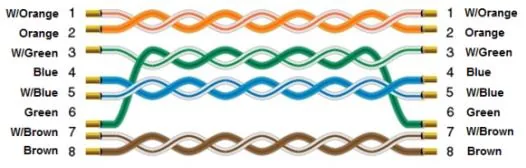
Wiring Diagram
The diagram below shows the Ethernet cable wiring.