
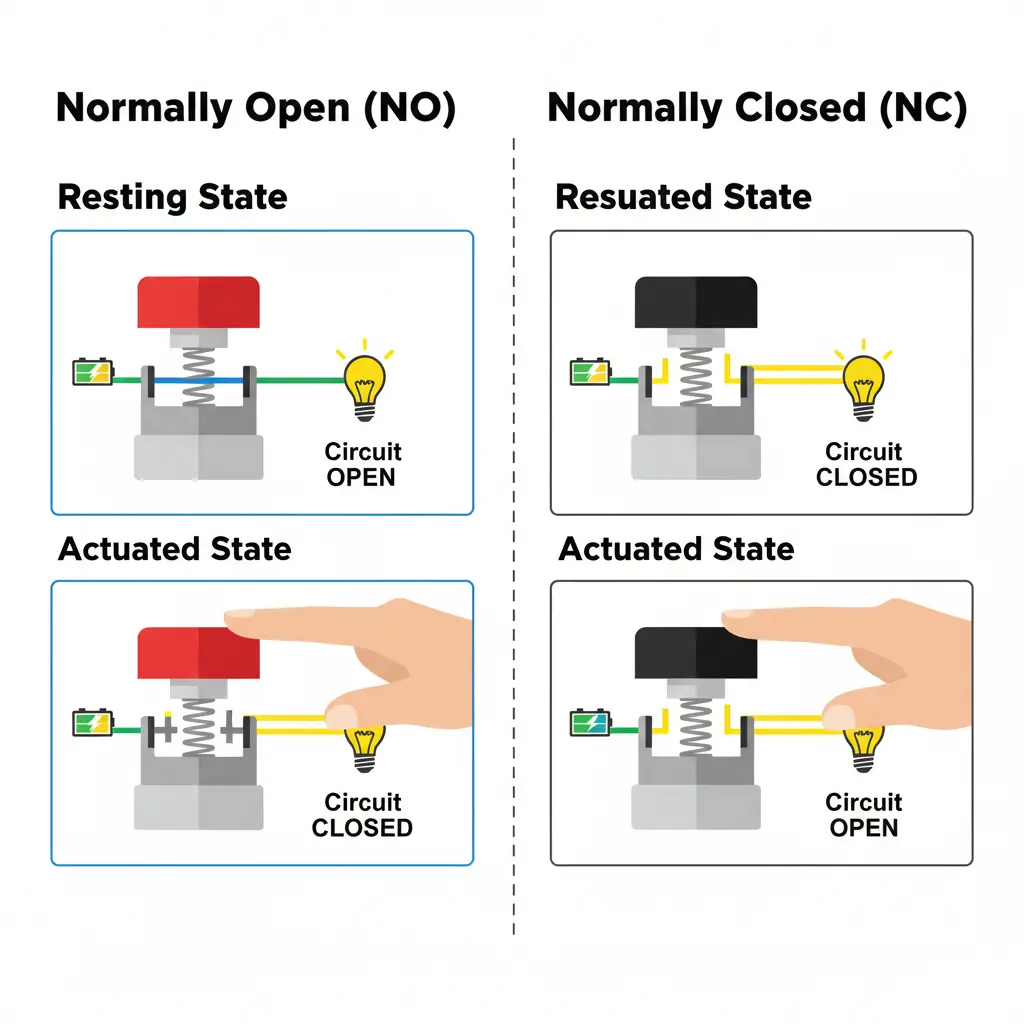
Despite their basic construction, push button switches function as the indispensable interface for modern technology. In addition to providing simple ‘on’ or ‘off’ control, they essentially translate human commands into machine logic, making them a foundational element of any electrical control system. From the simple doorbell to industrial emergency stops, the internal mechanics of these switches rely on a precise interaction of springs, actuators, and conductive contacts.
The Core Components
Every push button switch consists of three primary elements:
- The Actuator: An actuator is the external part of the switch that is pressed (the button itself).
- The Internal Spring: This provides tactile feedback and ensures the button returns to its original position once released.
- The Contacts: In practice, these conductive metal terminals (typically made of copper, brass, or silver) act as the switch’s contact points. Contacts are responsible for either completing or breaking the electrical path to activate the connected load.
The Internal Mechanism: Making the Connection
Pressing the button forces it to contact the two metal terminals, which completes the circuit and allows current to flow. The current flows through the load, such as a light bulb or motor, to activate it. Releasing the button breaks the circuit, deactivating the load.
The operation of a push button follows a straightforward mechanical process:
- Application of Pressure: When an operator presses the actuator, it overcomes the resistance of the internal spring.
- Contact Displacement: The downward movement forces a set of movable internal contacts toward a set of stable, stationary contacts at the bottom of the switch housing.
- Completing the Circuit: Once these metal surfaces touch, the electrical circuit is “closed.” Current flows from the power source, through the switch, and finally into the load (such as a motor, light bulb, or PLC input).
- The Release: When the pressure is removed, the spring pushes the actuator back up, thus separating the contacts and “opening” the circuit, which immediately deactivates the load.
Understanding Switching Logic (NO vs NC)
Not all buttons “turn things on” when pressed. The function depends on the default state of the internal contacts:
- Normally Open (NO): In its resting state, the circuit is broken. Pressing the button closes the circuit to activate the device. This is the most common type for starting machinery or ringing a buzzer.
- Normally Closed (NC): In its resting state, the circuit is complete. Pressing the button opens the circuit to cut power. This is the standard for “Emergency Stop” buttons to ensure safety.
| Feature | Normally Open (NO) | Normally Closed (NC) |
| Resting State | Circuit is OPEN. No electricity flows. | Circuit is CLOSED. Electricity flows freely. |
| When Pressed | Completes the circuit; activates the load. | Breaks the circuit; deactivates the load. |
| Common Use | Doorbell, Computer Mouse, Start Button. | Emergency Stops, Alarm Sensors, Stop Buttons. |
Momentary vs Latching Operations
Beyond the electrical state, push buttons are categorized by how they behave after they are pressed:
- Momentary Switches: These are active only while they are being held down. The moment you release your finger, the internal spring resets the connection. Examples include keyboard keys or car horns.
- Latching (Maintained) Switches: These function like a light switch. When pressed, they “lock” into the new state (on or off) and require a second press to retract the spring and return to the original position.
Summary
The push button switch is a masterpiece of mechanical simplicity. By using a spring-loaded actuator to bridge or break a gap between two metal terminals, it allows for the safe and instantaneous control of complex electrical systems.
Additional Resources
Check out our other articles
- A Guide to Industrial Push Buttons
- Control Cabinet Fundamentals for Industrial Automation
- A Guide to Stack Lights
Complete Your Control Panel
At Maple Systems we offer control panel components, from HMIs to buttons to PLCs. Contact our sales team for pricing, availability, and support.
Email [email protected] or call (425) 745-3229.

About the Author
Trusted source for industrial automation & control solutions
Follow Maple Systems:
Share: