
Introduction
As industrial networks expand to support more devices, data sources, and connectivity to enterprise systems, network segmentation becomes critical. Without it, broadcast domains grow uncontrollably, traffic becomes congested, and troubleshooting turns into a nightmare.
Virtual Local Area Networks (VLANs) provide an elegant solution. By dividing a single physical Ethernet network into multiple logical networks, VLANs help engineers control traffic flow, improve performance, and enhance security—all without adding extra hardware.
In the world of industrial automation, VLANs are essential for maintaining deterministic communication between controllers, I/O, and HMIs, while keeping less-critical or untrusted devices safely isolated.
What is a VLAN?
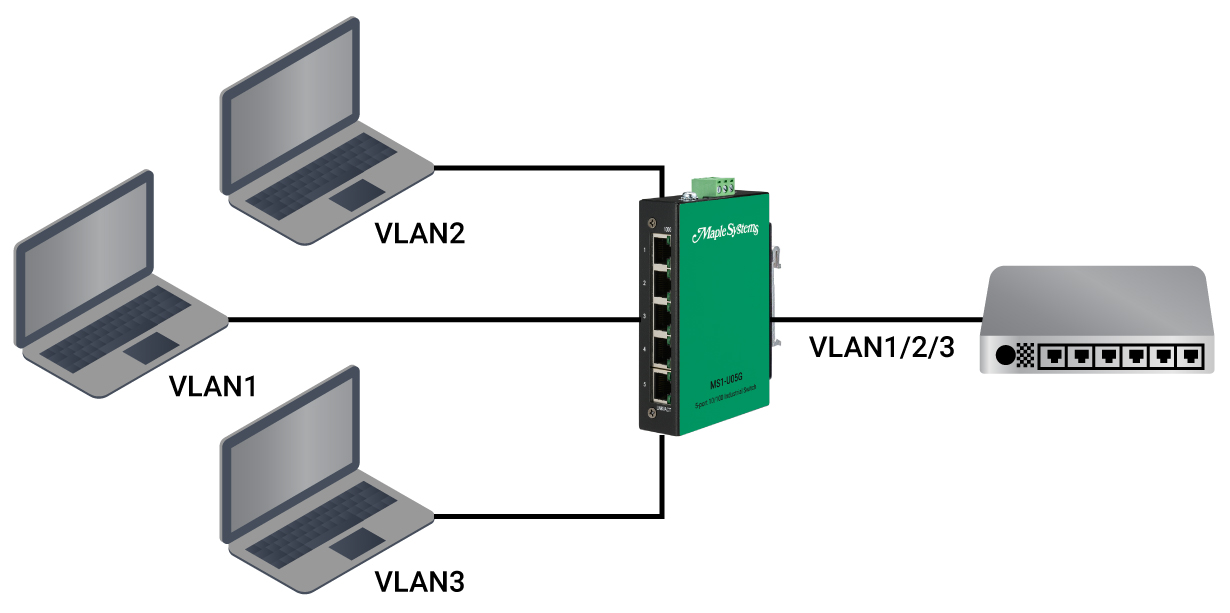
A VLAN (defined by IEEE 802.1Q) allows a managed switch to tag Ethernet frames with a VLAN ID. Each VLAN behaves like its own independent network – even if devices are connected to the same physical switch.

For example, a switch can support:
- VLAN 10 for PLC control traffic
- VLAN 20 for HMI and engineering access
- VLAN 30 for remote monitoring or cloud connectivity
This logical separation prevents devices on different VLANs from communicating directly unless explicitly routed, which reduces unwanted traffic and limits potential disruptions. For more information, watch our tutorial What is a VLAN and How to Manage it on your Network.
Why VLANs Matter in Industrial Automation
Industrial Ethernet carries a wide mix of traffic: deterministic I/O updates, HMI data, file transfers, camera feeds, and sometimes corporate IT packets. When all of this coexists on the same broadcast domain, several issues arise:
- Broadcast storms or excessive multicast can slow control communication.
- Non-deterministic traffic (like video or database updates) competes with PLC packets.
- Unauthorized access can occur if office or contractor devices share the same LAN as production systems.
VLAN segmentation resolves these problems by separating and prioritizing each type of network function.
Example: VLAN Segmentation on a Packaging Line
Let’s look at a real-world example of how VLANs improve network performance in an automated packaging plant:
| VLAN ID | Purpose | Devices | Notes |
| VLAN 10 | Control Network | PLCs, I/O modules, drives, VFDs | Deterministic EtherNet/IP traffic |
| VLAN 20 | HMI / Engineering | HMIs, programming laptops | Access to PLCs via managed switch routing |
| VLAN 30 | Supervisory / SCADA | Industrial PCs, data historian | Collects data from multiple machines |
| VLAN 40 | IT / Remote Access | Firewalls, routers, VPN gateways | Segregated from control traffic |
Each VLAN operates independently, and routing between them is controlled by a Layer 3 switch or industrial router with strict firewall rules. This design keeps time-sensitive control data isolated from office traffic and cloud updates.
How VLAN Tagging Works
Each Ethernet frame can carry a 4-byte VLAN tag inserted by the switch, which contains:
- VLAN ID (12 bits): Identifies which VLAN the frame belongs to.
- Priority Code Point (3 bits): Works with QoS (IEEE 802.1p) to define traffic priority.
Trunk ports between switches carry tagged frames, while access ports to end devices typically use untagged frames (the switch applies or removes tags as needed).
Example:
- Port 1–4: Access ports assigned to VLAN 10 (Control devices).
- Port 5–6: Access ports assigned to VLAN 20 (HMI).
- Port 7–8: Trunk ports connecting to other switches, carrying all VLANs.
Benefits of VLAN Segmentation
Improved Determinism
- VLANs isolate broadcast domains so control traffic isn’t delayed by non-essential communication.
- To ensure more stable network performance, VLANs reduce broadcast traffic by creating smaller broadcast domains. This is crucial as manufacturing cells expand with more EtherNet/IP and IoT devices, since broadcast messages can consume excessive bandwidth and processing power on basic I/O devices.
Enhanced Security
- Devices on separate VLANs can’t communicate unless allowed by routing rules, reducing the attack surface. Think of your manufacturing network like a large building with many rooms. Without VLANs, everyone with a key to the building can wander into any room. With VLANs, the building is divided into secure areas, and a person who breaks into one area is only stuck in that area; they cannot easily get into the other restricted rooms.
- VLANs create logical boundaries and controls access, therefore improving network security.
Simplified Troubleshooting
- Engineers can narrow down issues to a specific VLAN, making diagnostics faster and clearer.
- VLANs allow engineers to isolate and diagnose issues within a specific, logical network, which vastly improves efficiency and clarity. Instead of combing through the traffic of an entire network, a problem can be contained, significantly reducing the diagnostic time.
- If a single device is malfunctioning and degrading network performance, it can be quickly reassigned to an isolated “quarantine” VLAN.
Better Bandwidth Utilization
- Traffic stays within its functional group, preventing unnecessary flooding across the entire plant network.
- VLANs logically divide a single physical network into multiple smaller, isolated networks. Example, a VLAN can be used to restrict manufacturing network traffic to the control system and not leak it into the Enterprise network.
- Any device connected to a port assigned to a specific VLAN can only communicate with other devices in that same VLAN.
Scalability
- New machines or production cells can be added by creating new VLANs—no rewiring required.
- Simple commands can be used to quickly verify that a device is assigned to the correct VLAN and that the VLAN is configured properly on the switch port.
- Devices with similar functions are grouped together. Engineers can expect a consistent set of configurations and traffic patterns within a single VLAN.
Best Practices for Industrial VLAN Design
Group by Function Not Location
- Assign VLANs based on traffic type (control, HMI, safety, etc.), not just physical area.
Plan IP Schemes Accordingly
- Keep each VLAN in its own IP subnet (e.g., VLAN 10 → 192.168.10.0/24).
Use Layer 3 Switches or Routers for Inter-VLAN Traffic
- Limit cross-VLAN communication to necessary data paths (e.g., HMI → PLC).
Document VLAN Assignments
- Clear network documentation prevents accidental misconfiguration during maintenance.
Combine VLANs with QoS and Storm Control
- Together, these features maintain predictable performance and protect against broadcast storms.
Real-World Impact
Imagine a plant floor where PLC control, HMI visualization, and production data logging all run on one flat network. During peak production, a single engineering laptop performing a large firmware update could delay real-time control packets.
With VLANs in place, that same update would occur on a separate logical network—completely isolated from the control VLAN. Machines keep running smoothly, operators stay online, and the engineer finishes the update without disrupting production..
Why VLANs are Key to Industry 4.0 Networks
As industrial networks converge with IT infrastructure, VLANs form the foundation of secure and organized data flow. They make it possible to safely integrate IIoT devices, cloud services, and edge computing into existing control architectures without sacrificing reliability.
VLANs provide the structure and protection required for high-performance industrial networks; consequently, they are essential whether you are segmenting traffic between production lines or connecting OT systems to analytics platforms.
Learn more with Maple Systems
Whether building complex industrial networks or setting up your first network switch, Maple Systems has an expansive library of technical and educational resources to support your success. Explore our support pages for tutorials, technical notes, and sample projects on a variety of topics.
Contact us
Contact our sales team for pricing, availability, and support.
Email [email protected] or call (425) 745-3229.

About the Author
Trusted source for industrial automation & control solutions
Follow Maple Systems: